ResiProxies vs NSOCKS: residential proxy comparison
ResiProxies runs a gateway-style residential pool billed per gigabyte, while NSOCKS rents individual residential IPs by the day. Both cover geo targeting and SOCKS5, but billing unit, session control and entry point differ structurally. This guide compares the two on documented parameters only, without ranking one above the other.
Legend used in every table below: ✅ documented by the vendor · ❌ not offered or not documented · ⚠️ documented with limits · 💡 practical tip. No other marks are used on this page.
Why these two are not the same kind of product
A gateway pool and a per-IP marketplace can look similar from a distance, yet the mechanics underneath are built differently. ResiProxies and NSOCKS sit in two different product categories, and that single fact drives most of the differences below. The first operates a traffic-based gateway: connect once, and the residential ip pool rotates behind the scenes while billing runs on gigabytes consumed. NSOCKS works closer to a marketplace, where a buyer picks a specific IP and rents the port for a fixed 24-hour window.
Because of this split, some table rows further down will read Not applicable, different service model. That is not missing data, it is the direct result of comparing a bandwidth product with a per-IP rental product. ResiProxies documents its side as a gigabyte-based gateway pool, and that framing carries into every row below. Protocol support, targeting granularity and proxy dashboard behavior before checkout stay comparable regardless. 💡
ResiProxies vs NSOCKS: comparison summary
This proxy provider comparison starts with structure, not price, since rates shift constantly and structure rarely does. One side bills by traffic volume, the other by IP rental, and that split explains most rows below. Targeting depth and protocol coverage are worth checking first on either official page. The table reflects publicly documented pages only, and a not published cell means the provider has not disclosed that figure anywhere we could verify.
| Parameter | ResiProxies | NSOCKS | data as of August 2026 |
|---|---|---|---|
| Service model | Gateway pool, traffic-based | Per-IP marketplace, 24h rental | ✅ documented |
| Proxy types | Rotating residential, static residential | Residential, mobile, ISP, static, UDP | ✅ documented |
| Protocols | HTTP(S), SOCKS5 | HTTP(S), SOCKS5, SOCKS5 UDP | ✅ documented |
| Billing unit | Per GB | Per IP, 24 hours | ✅ documented |
| Targeting levels | Country, state, city, ISP | Country, state, city, ZIP, ISP, IP type | ✅ documented |
| Minimum entry | 1 GB at $10.00 per GB, promo, base $15.00 | Single IP from $0.40 for 24 hours, pay as you go | ⚠️ documented with limits |
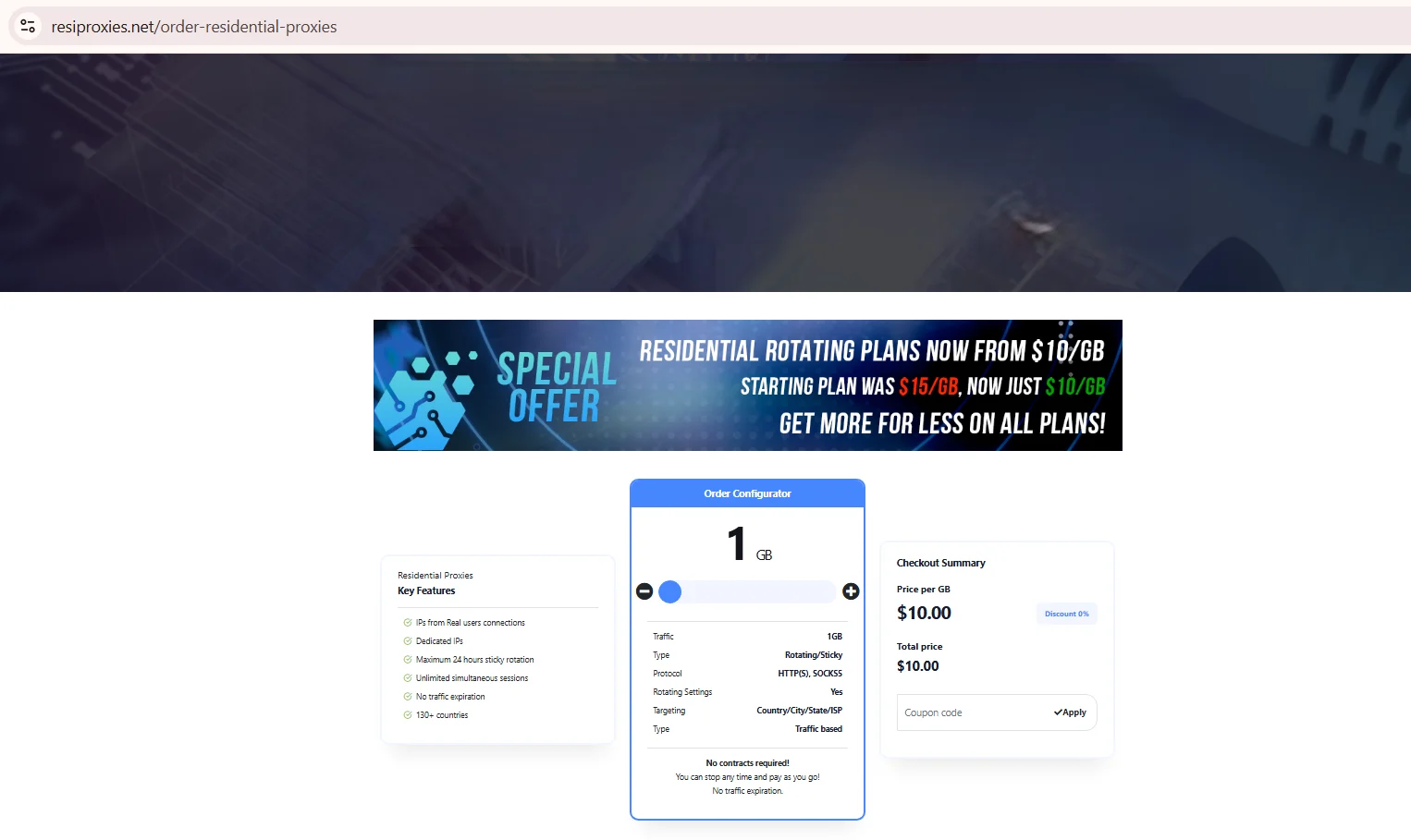
Source: Order Residential Proxies, resiproxies.net, screenshot taken 21.08.2026
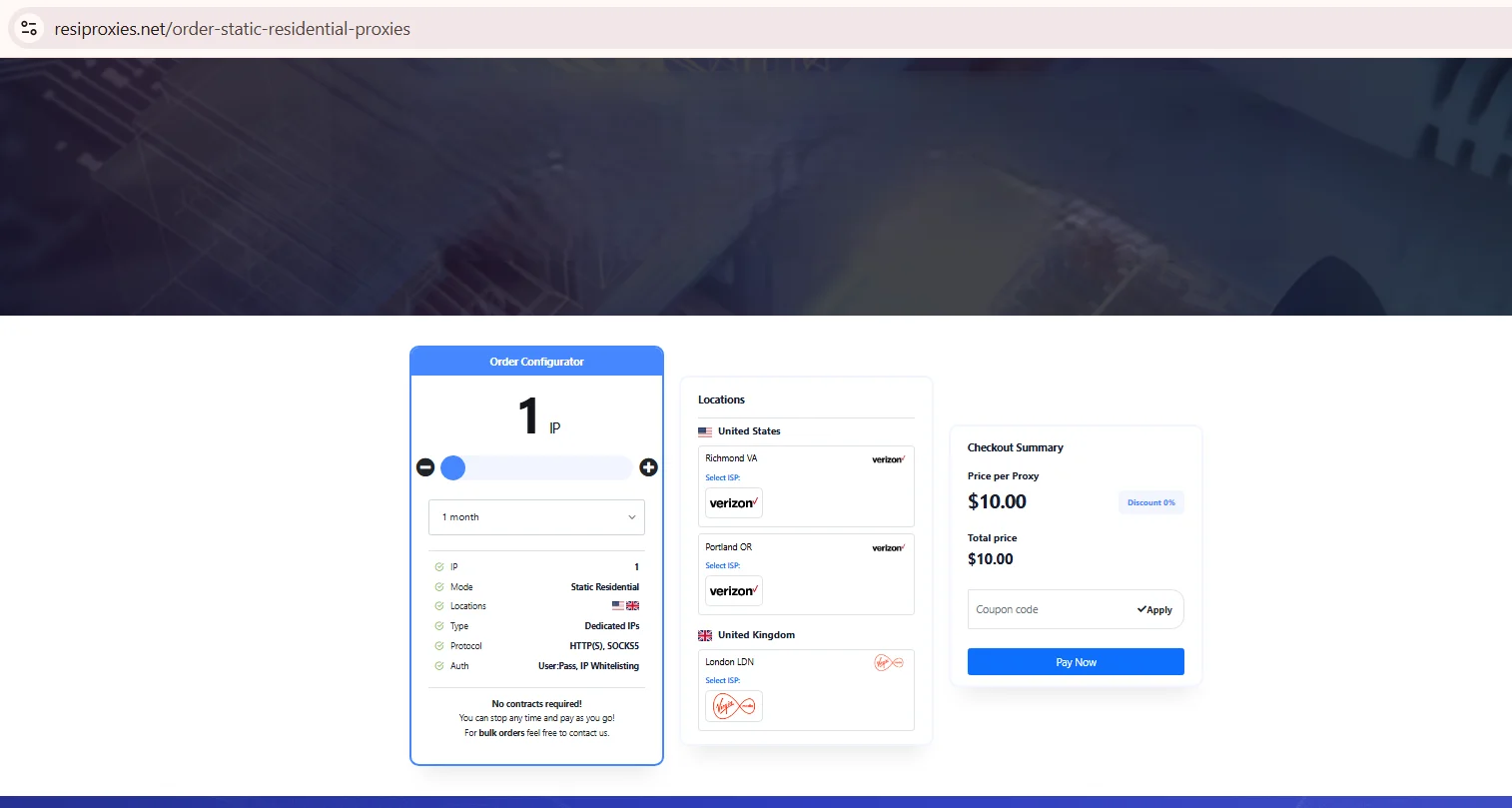
Source: Order Static Residential Proxies, resiproxies.net, screenshot taken 21.08.2026
Pool coverage and geo-targeting
Both sides publish country-level coverage, but targeting depth past that point differs by vendor page rather than by service category. Residential proxy providers rarely disclose an audited pool size, so treat any figure as a claim, not a verified total. NSOCKS documents city, ZIP code and ISP-level filters on its ordering screen, letting a buyer narrow a purchase before paying, across residential, mobile, ISP, static and UDP products. The ResiProxies order configurator lists targeting as country, city, state and ISP on the rotating product, and the static product lets a buyer pick a city and a named carrier before checkout.
- Country-level targeting: documented by both sides, ResiProxies states 130+ countries on its order page
- City-level targeting: documented by both sides
- ISP filtering: documented by both sides, with NSOCKS adding ZIP code and IP type to the same filter
Pool size claims specifically should be read as marketing statements until a dated screenshot backs them up.
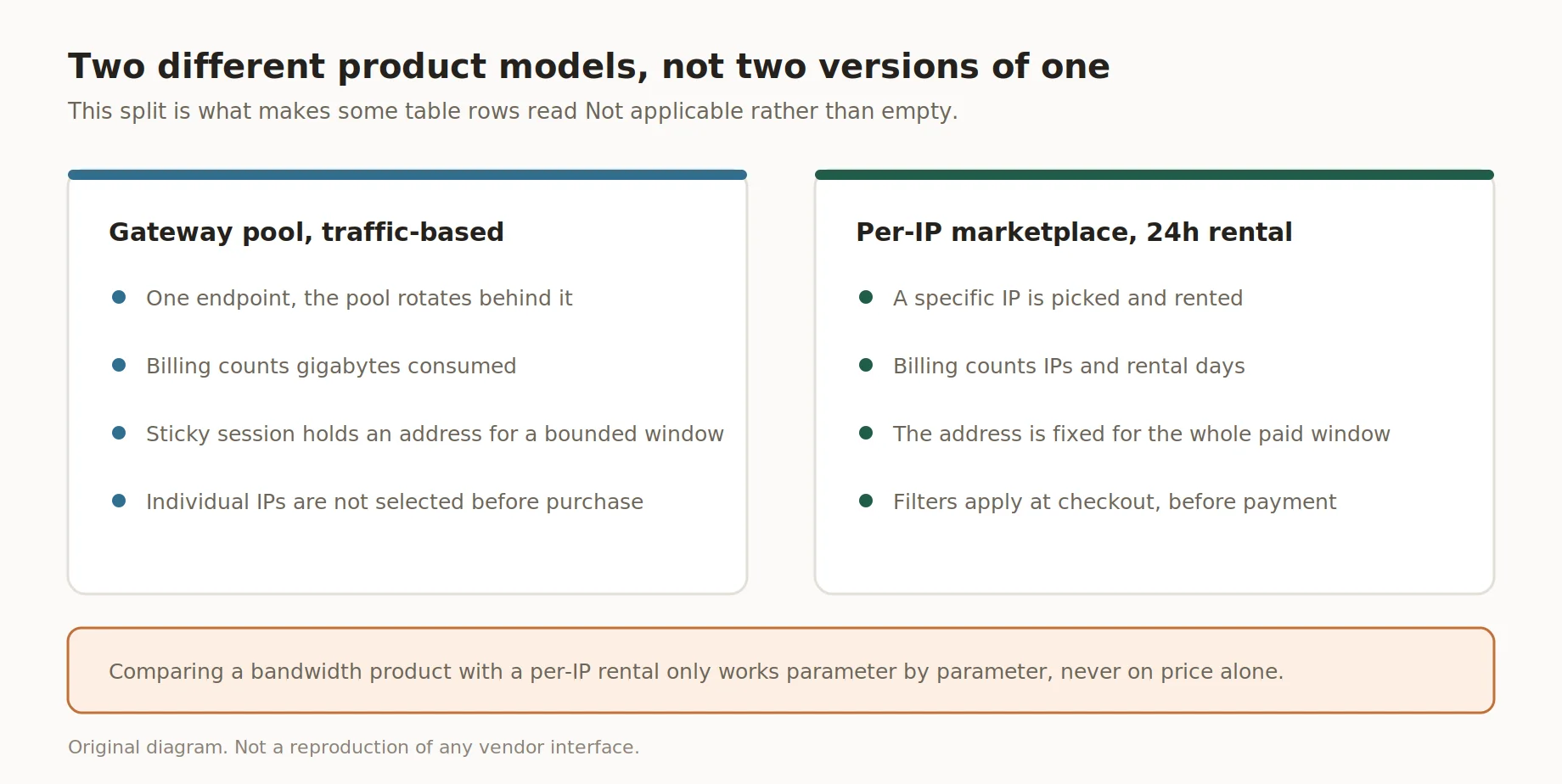
Two different product models, not two versions of one
Protocol support: SOCKS5 and HTTP(S)
Both providers document SOCKS5 support alongside HTTPS, covering most scraping, automation and browser-based tasks without extra setup. A socks5 residential proxy is the more flexible pick when an app needs raw TCP rather than an HTTP wrapper, and both vendors list the socks5 protocol on their public pages. NSOCKS lists UDP proxies as a separate product and describes them as low-latency SOCKS5 UDP, so UDP is documented on that side. ResiProxies names only HTTP(S) and SOCKS5 in its order configurator, so UDP stays unconfirmed there. One side assigns a fixed port per rented IP for the full window, the other routes through a shared gateway endpoint instead.
Port behavior aside, the protocol string itself matters most for non-browser clients that connect directly rather than through a browser extension.
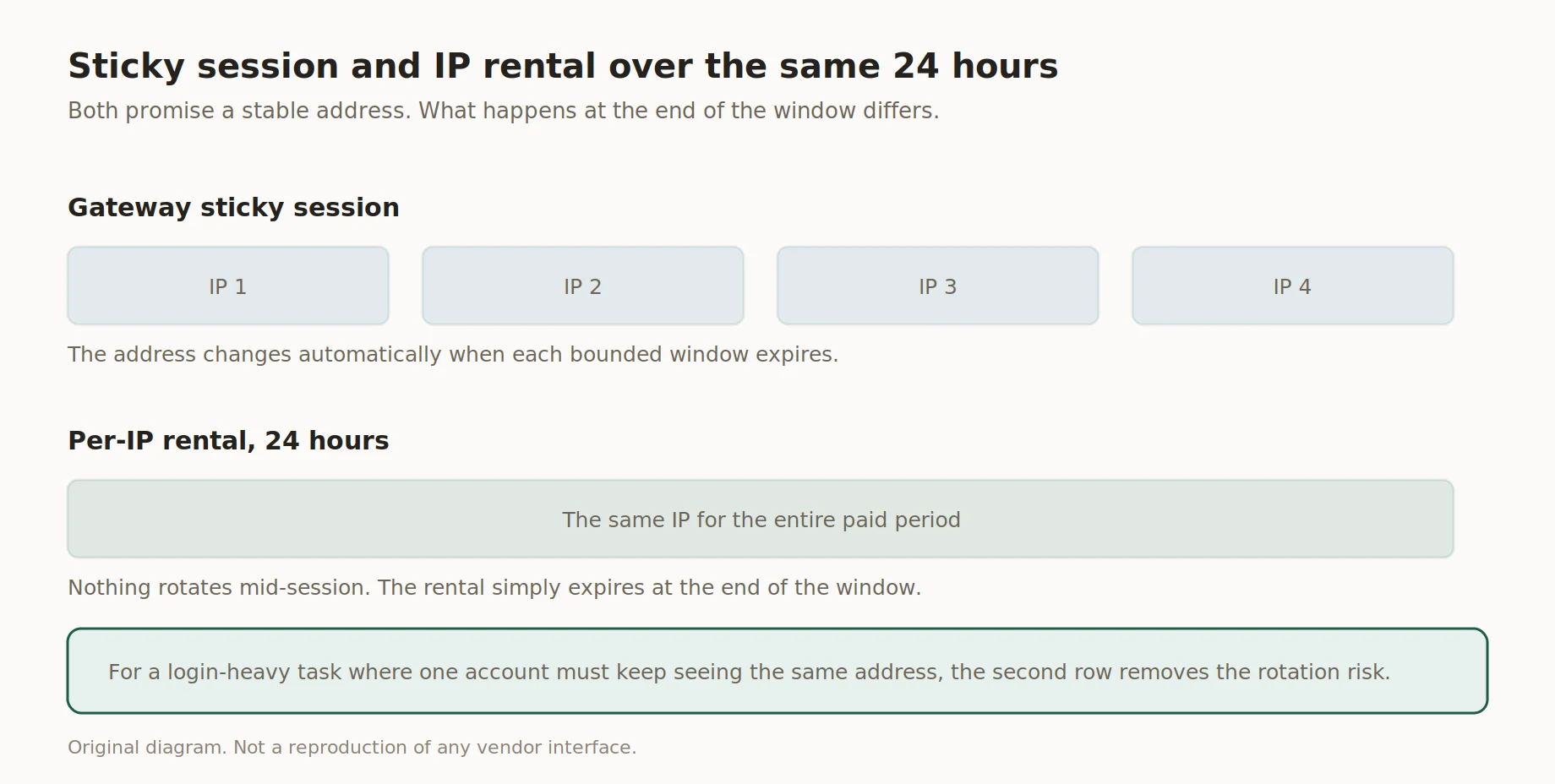
Sticky session and IP rental over the same 24 hours
Rotation, sticky sessions and IP lifetime
Sticky session logic and IP rental are not the same mechanism, even though both promise a stable address for a while. ResiProxies proxies inside the pool can hold a sticky address for up to a defined window, commonly documented as sticky up to 24 hours, after which a rotating proxy swaps in a new one. NSOCKS sells the IP itself for a fixed 24-hour rental, so the address does not rotate mid-session, it simply expires at the end. The two mechanics look similar from outside but resolve differently past that window.
- ✅ Gateway sticky session: same IP for a bounded window, then automatic rotation
- ✅ Per-IP rental: same IP for the full paid period, no rotation until expiry
- ❌ Mixing the two models in one workflow without reading the docs first
For a login-heavy task where one account must keep seeing the same address, per-IP rental removes the rotation risk ResiProxies proxies carry by design inside a shared gateway pool.
Pricing and billing models
Money only makes sense as a comparison once the billing model is clear, so structure comes first here too. One side charges per gigabyte, the other per IP for a 24-hour block, so a dollar comparison only makes sense once the workload defines the unit consumed. Neither figure belongs permanently in an article, since both providers can change rates without notice. Picking among the best residential proxies for a fixed budget depends on whether the job burns bandwidth fast or needs a handful of stable addresses.
| Provider | Billing model | Unit | What to check |
|---|---|---|---|
| ResiProxies | Traffic-based | Per GB | Volume tier, promo flag, refund policy |
| NSOCKS | Pay as you go | Per IP, 24h | Listed price before checkout, refund window |
As of 21 August 2026, the ResiProxies order configurator shows rotating residential at $10.00 per GB under a promotional banner that lists $15.00 per GB as the base rate, and static residential at $10.00 per proxy for a one-month term with a choice of city and carrier. NSOCKS states that IPs start from $0.40 per 24 hours on a pay as you go basis, with pricing dependent on type, quality and rental duration, and a 50 percent discount applied to products flagged as blacklisted. Both figures were promotional or conditional at the time of the check.
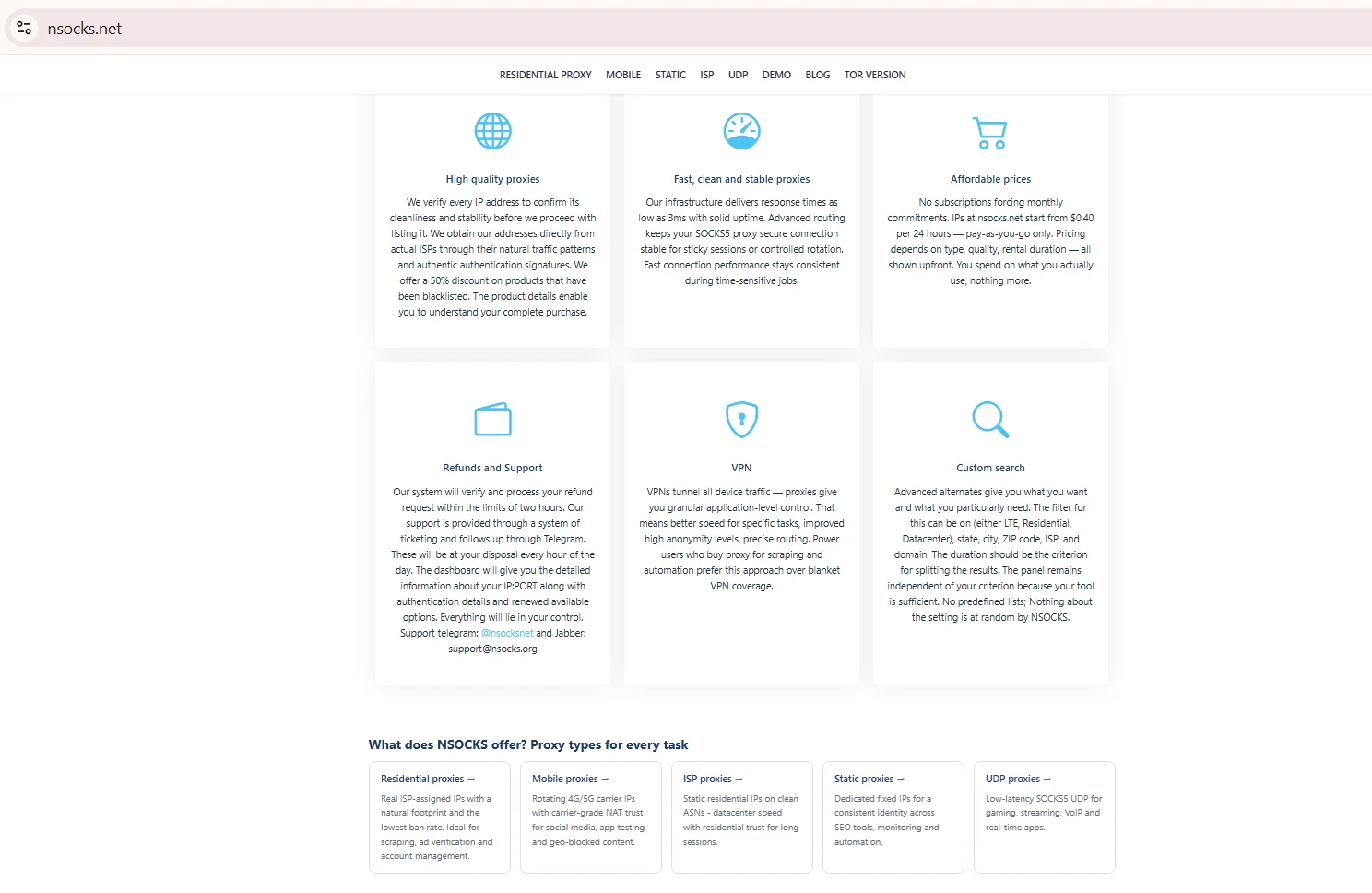
Source: NSOCKS homepage, product blocks, nsocks.net, screenshot taken 21.08.2026
Dashboard, access and what to check before you buy
Neither company publishes a public API reference, so this section is a checklist rather than a walkthrough of endpoints that do not exist. A short ResiProxies review of account access shows the same gap on both sides: no API docs, but a working order screen. Before funding an account, confirm a short list of dashboard behaviors rather than assume they match. None of this needs special access, every item below sits on a standard account page.
- ✅ Authorization method is documented on the sign-up or account page
- ✅ IP list export or visibility is available before or after payment
- ✅ Filters for country, city or ISP are visible at checkout, not hidden
- ✅ Refund or credit policy is published, not just implied in chat
Support and documentation
Support channels and public terms differ more than the underlying technology does, so a quick check saves time later. A fair ResiProxies review of support has to note what NSOCKS states directly: chat-based support plus a refund process for IPs that go offline early. Public SLA terms are not published on either site at time of writing. A channel that answers fast during a trial is a fair signal for real spend later.
Which configuration fits which task
The right setup depends on whether a task needs volume or address stability, and that question filters out most guesswork. A scraping job touching thousands of pages a day usually fits a rotating pool better than a per-IP rental, purely on cost per request. Among the best residential proxies for a login-persistent task, a fixed address held for the full session tends to win. Match the model to the task first, then compare cost.
| Task | What matters | Which configuration fits |
|---|---|---|
| High-volume scraping | Cost per GB, success rate | Traffic-based rotating pool |
| Account management, one login | Address stability | Per-IP 24h rental with ISP filter |
| Long-term monitoring, one region | Consistent geo, uptime | Static IP per month, where available |
| Ad verification across cities | City-level targeting | Per-IP 24h rental with city filter |
How to test both before you commit
Testing both on the same day, against the same target list, removes most of the noise from comparing different weeks of network conditions. The starting point is not equal either: one side typically requires a paid entry of at least 1 GB with no stated refund, while NSOCKS lets a buyer sign up, browse the live IP list and buy a single IP for 24 hours first. Running a socks5 residential proxy check on both is the fastest way to see real behavior. That asymmetry is a fact about entry cost, not quality.
- Run 200+ requests per provider against the same targets
- Record latency as p50 and p95, not one average
- Test sticky session or rental stability at 10, 30 and 60 minutes
- Cross-check geo location with an independent IP lookup tool
- Log success rate separately per proxy type before comparing totals
Key takeaways
This short ResiProxies review comes down to five points worth remembering before testing either service. 📌
- One side bills per GB through a gateway pool, the other per IP for 24 hours
- Both document SOCKS5 and HTTPS, neither documents UDP
- NSOCKS shows city, ZIP and ISP-level targeting on its ordering page
- Entry cost is asymmetric: a paid GB minimum vs single-IP buying
- Treat every price as a snapshot and re-verify on the official page
Disclosure and data sources
This comparison covers ResiProxies and NSOCKS strictly through information each company publishes.
This article is published by NSOCKS. NSOCKS is one of the services listed and we have a commercial interest in it. We are not affiliated with any other provider mentioned; none of them sponsored or reviewed this article. Third-party data was taken from the providers' own pages in August 2026 and may be promotional. All trademarks belong to their respective owners and are used for identification only.
ResiProxies has not been contacted for any figures beyond what appears on its public pages, and neither has any other brand named above.
Disclaimer: data on this page is current as of publication date. Rates, targeting options and minimum entry points can change without notice. NSOCKS is not affiliated with the other brands mentioned, and trademarks belong to their owners. Verify current pricing and terms on each provider's official site before purchasing.
Frequently asked questions
What does per-IP 24-hour billing mean compared with per-GB billing?
Per-IP billing charges for holding one address for 24 hours, per-GB billing charges for traffic used regardless of IP count.
Are ResiProxies and NSOCKS the same type of service?
No, one is a traffic-based gateway pool, the other a per-IP rental marketplace.
Do both services support SOCKS5?
Yes, both publicly document SOCKS5 alongside HTTPS on their official pages.
What does sticky up to 24 hours actually mean?
The gateway keeps one IP for up to that window, then rotates to a new address.
Can I see the IP quality before paying?
NSOCKS shows the IP list and filters before checkout; the other side does not.
How do I verify a pricing claim on either website?
Open the official pricing or order page and screenshot it with the date visible.