WebRTC leak and DNS leak: how to prevent IP exposure
A WebRTC leak happens when a browser exposes your real IP through STUN requests, even while a proxy runs. A DNS leak happens when domain lookups go to your ISP instead of the proxy tunnel. Both defeat the point of routing traffic through Nsocks or any provider. Testing takes minutes, and fixes below apply to Chrome, Firefox and scripted sessions.
Legend used on this page: ✅ confirmed by the check · ❌ leak or missing control · ⚠️ partial protection · 💡 practical tip. No other marks are used.
What a WebRTC leak is
A WebRTC leak exposes your local or public IP through ice candidates gathered during a peer connection, no matter what proxy settings say. Browsers use WebRTC for video calls, and stun server requests travel over UDP, which most HTTP-based proxies never touch. The address bar looks proxied, but the browser quietly reports something else.
💡 Run a WebRTC Leak test before any client-facing task, not after something already looks off.
What a DNS leak is
A DNS leak occurs when hostname resolution happens on your local network instead of through the proxy. DNS queries reveal which sites you visit, and the resolver used often exposes the original network. Standard SOCKS5 configs resolve DNS locally by default, which is where this exposure starts.
Leak types, causes and fixes
Most exposure problems trace back to a short list of causes. The table below is the single reference this article uses, so leak types aren't repeated under every heading. Each row lists a cause, a way to spot it, and the fix.
| Leak type | Cause | How to detect | Fix |
|---|---|---|---|
| WebRTC | stun requests bypass proxy over UDP | Browser ice candidates check | Restrict IP handling policy |
| DNS | Resolver queries sent outside tunnel | Compare resolver to proxy location | Use remote dns resolution |
| IPv6 | Proxy covers IPv4 only | Dual-stack test shows a second address | Disable IPv6 or route it |
| mDNS candidate | Local hostname exposed during ice gathering | mdns hostname visible | Enable candidate obfuscation |
| Dropped tunnel | Proxy disconnects mid-session | Sudden IP change mid-job | Add fail-fast logic |
How to test your setup for leaks
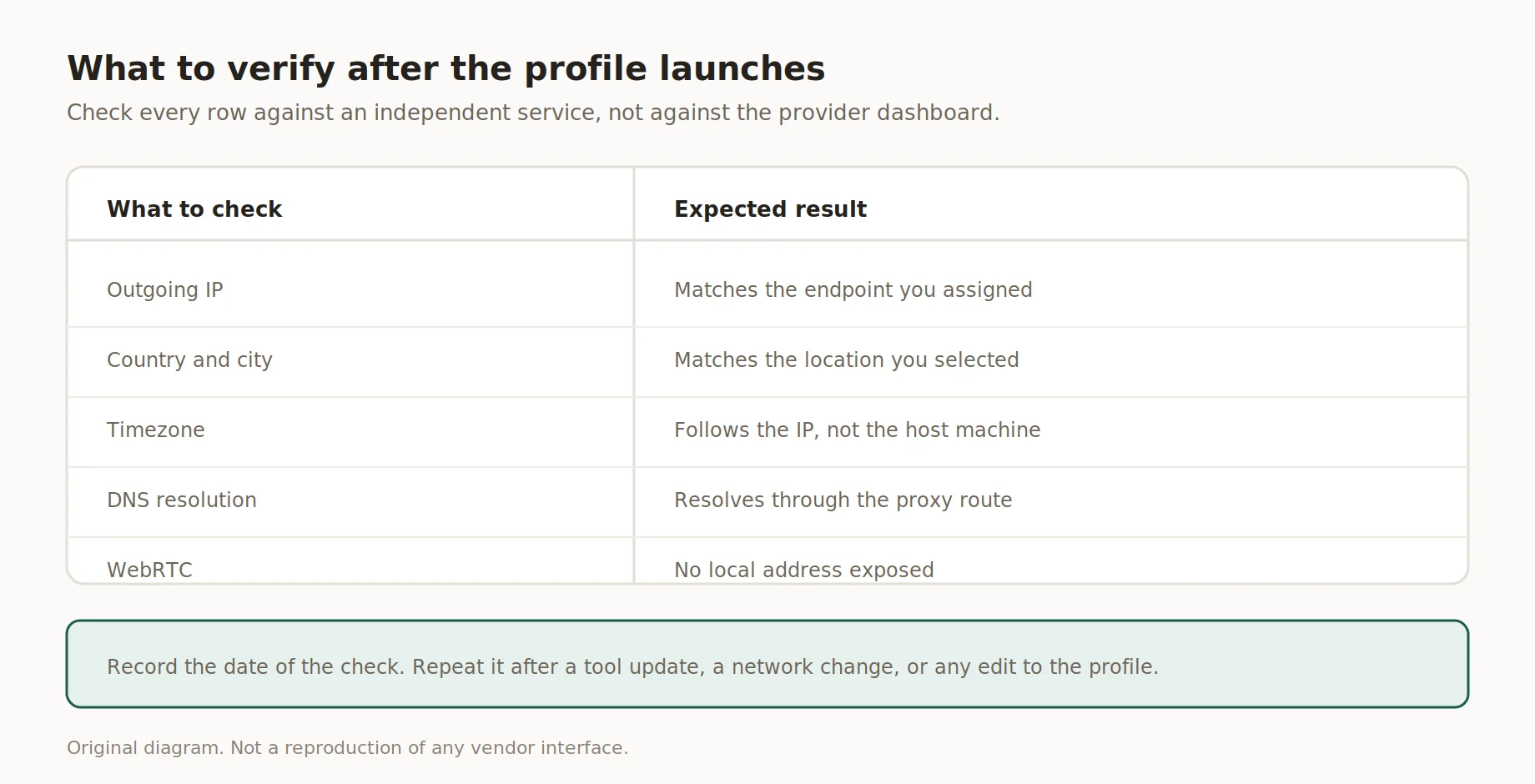
What to verify after the profile launches
A WebRTC Leak test paired with a DNS Leak test catches most exposure before it hits production. The steps below work the same for a browser tab or a scripted session. Run all five every time, not only when something feels off.
- Note your real IP with the proxy off.
- Turn the proxy on and confirm the shown IP changed.
- Run an ip Leak test with a resolver check on a reputable site.
- Compare each result against your real IP and ISP resolver, flag any match.
- Repeat inside the real working environment, since a clean tab result means little for automation.
How to prevent DNS leaks with socks5h
Plain SOCKS5 resolves hostnames on the client, while socks5h sends that lookup through the proxy itself. That single letter closes the most common DNS Leak path outright. Remote dns resolution keeps every query in the tunnel, which matters for research, QA and market-specific work.
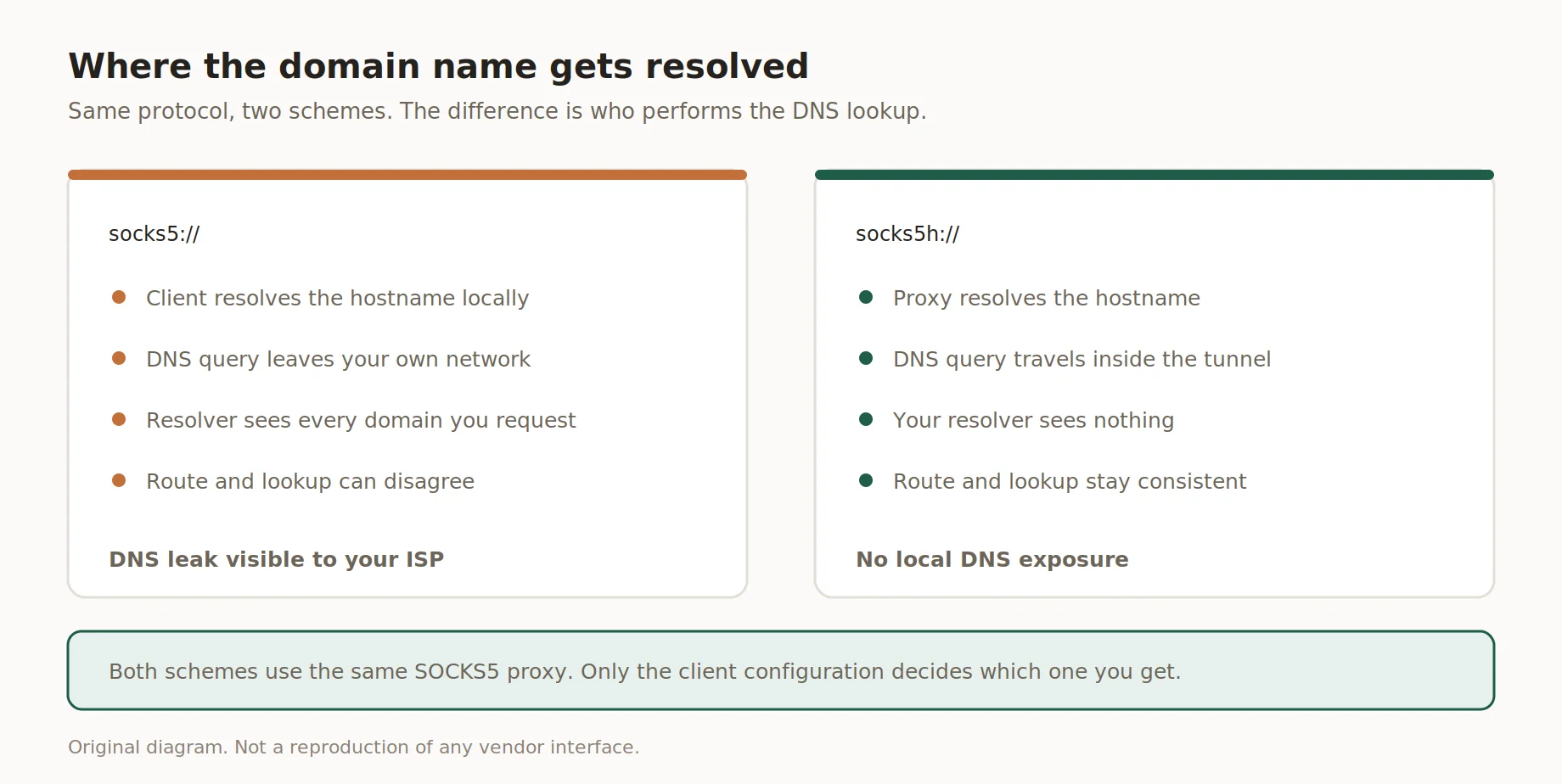
Where the domain name gets resolved
curl --socks5-hostname USERNAME:PASSWORD@PROXY_IP:PORT https://example.com
Most scraping libraries default to plain socks5 unless told otherwise, so checking the string is worth thirty seconds. ✅ Documented socks5h support saves a step.
How to control WebRTC in the browser
Browsers ship with different WebRTC IP handling policies, and none promise full anonymity alone. Firefox lets you disable WebRTC entirely through about:config, while Chromium relies on the same policy or an extension since there's no native toggle. The policy set to disable non-proxied UDP forces ice candidates through the active proxy.
- ✅ Firefox: media.peerconnection.enabled to false, or ice.no_host for partial protection
- ✅ Chromium: IP handling policy set to disable non-proxied UDP
- ⚠️ Extensions help, but updates can reset settings
- ❌ Assuming a proxy blocks WebRTC automatically, most don't
Retest after every browser update, since vendors change default behavior more than release notes suggest. A bad policy is often the biggest cause of a WebRTC Leak at this layer. mDNS obfuscation hides the local IP, but the public side needs its own fix.
IPv6 traffic and untunneled routes
IPv6 traffic slips past a proxy built only for IPv4, and that gap is one of the more overlooked exposure paths right now. A dual-stack connection can show a clean IPv4 address via the proxy while IPv6 routes out through the real ISP. Most IP checkers only show the IPv4 result. A WebRTC ip Leak through an untunneled IPv6 interface looks identical to a clean session.
💡 Disable IPv6 at the adapter level if the proxy setup doesn't cover it, or confirm dual-stack routing before running anything client-facing.
Consistency: IP, DNS, timezone and language
Passing tests still leave gaps if other signals don't line up. A DNS Leak test alone won't catch a timezone mismatch between the system clock and the proxy's region. Language, keyboard layout and locale all feed the same picture a platform builds from a session. This risk multiplies across several client profiles, and the deeper breakdown lives in our guide on managing multiple browser profiles.
Pre-flight checklist for automated jobs
Automated and headless browser jobs need a repeatable check before every run, not a one-time setup. This list differs from the manual steps above, since scripts fail quietly in ways a tester notices right away. Treat it as the minimum bar before production.
- ✅ Log outgoing IP per request, not only at session start
- ✅ Fail fast if the logged IP falls outside the expected range
- ✅ Re-check for leaks after any browser or driver update
- ✅ Confirm remote resolution is active in the connection string
- ✅ Check IPv6 routing separately from IPv4
- ✅ Verify timezone and locale match the proxy's region
- ⚠️ Treat last week's pass as expired, not current
- ❌ Don't skip the check because "it worked yesterday"
A short list earns its keep only if someone owns it, so pin it where the team sees it before a job goes live.
Common mistakes
Most repeat exposure issues come from process gaps, not some unknown leak type. Teams often check once at setup and skip retesting after an update ships. Testing in a normal tab, instead of the real environment, gives a false sense of security. Relying only on a provider's dashboard, rather than an independent checker, misses what it wasn't built to catch. Treating one WebRTC Leak as a one-off, instead of a process failure, guarantees a repeat.
How proxy setup affects leak risk
Disclosure: Nsocks is our service, and this section describes how our setup handles the risks above. We sell residential proxies and static IP proxies, both with remote DNS resolution on the proxy side. Most support tickets about a WebRTC Leak trace back to one row in the table above. The table lists what each feature means day to day, not marketing language.
| Feature | What it means in practice |
|---|---|
| socks5h support | Resolution happens on the proxy, not client |
| IPv6-aware routing | Dual-stack traffic stays in tunnel where supported |
| Documented IP handling | Steps match current browser policies |
| Session logging | Outgoing IP visible per request for QA |
None of this replaces browser-level configuration or the habit of retesting. A proxy handles routing; the browser decides what it reveals. Teams that run a WebRTC Leak test before every client session see fewer surprises. Try the Nsocks demo to see connection details, or register for dashboard access.
Key takeaways
- Run a leak test for WebRTC and DNS before every client session, not just once.
- socks5h moves resolution onto the proxy, closing the most common exposure path.
- IPv6 needs its own check, since most IP tools default to showing IPv4 only.
- Consistency across IP, DNS, timezone and locale matters as much as one test.
- Retesting after updates catches most leaks teams describe as "sudden."
Disclosure and data sources
This article is published by Nsocks. We sell proxies and have a commercial interest in the section describing our own setup. Testing tools and browser settings referenced belong to their respective owners, including browser vendors and independent checker services. Details were checked August, 2026, and behavior may change between versions, so re-verify flags first.
Frequently asked questions
What is a WebRTC leak?
A browser reveals your real IP through STUN or ICE candidates despite an active proxy.
How do I test for a DNS leak?
Run a resolver check on a leak testing site and compare it to your proxy's location.
What is the difference between SOCKS5 and socks5h?
SOCKS5 resolves hostnames locally; socks5h sends that lookup through the proxy server.
Does disabling WebRTC break video calls?
Yes, disabling it stops calls fully, so partial ICE restrictions work better.
Can IPv6 expose my real IP?
Yes, if a proxy only handles IPv4 traffic, IPv6 can also bypass it.
How often should I re-test my automation setup?
After every browser or driver update, plus on a schedule regardless.