nsocks.net vs nsocks.com: how to identify the official site
The official domain for this proxy provider is nsocks.net, and nothing else. A genuine page always sits on nsocks.net, and lists support contacts published nowhere else. A page on that domain carries a valid SSL certificate issued for exactly that address. This guide covers five checks anyone can run in a few minutes before logging in or paying. No technical background needed, just a browser and a bit of patience.
Legend used on this page: ✅ confirmed signal · ❌ warning sign · ⚠️ partial signal, not proof on its own · 💡 practical tip. No other marks are used.
Which domain is the official NSOCKS website
Confusion usually starts with a search ad, a forwarded link, or an old bookmark that quietly points somewhere odd now. The NSOCKS official site sits on nsocks.net, and every legitimate service page, dashboard link and support contact traces back to that one address, including the residential, ISP, static and mobile product pages. Any other ending, including a .com version of the same name, is simply not the address this provider publishes, and we make no claim about who operates such addresses or what they contain. Anyone landing on a page claiming to represent the brand should confirm the address bar reads exactly that domain, with no extra words or endings tacked on.
Official channels currently listed on the homepage include a Telegram support account and a Jabber contact, both linked from the footer. Bookmarking the real address removes the guesswork for future visits, and typing it manually beats clicking a link from an unsolicited message.
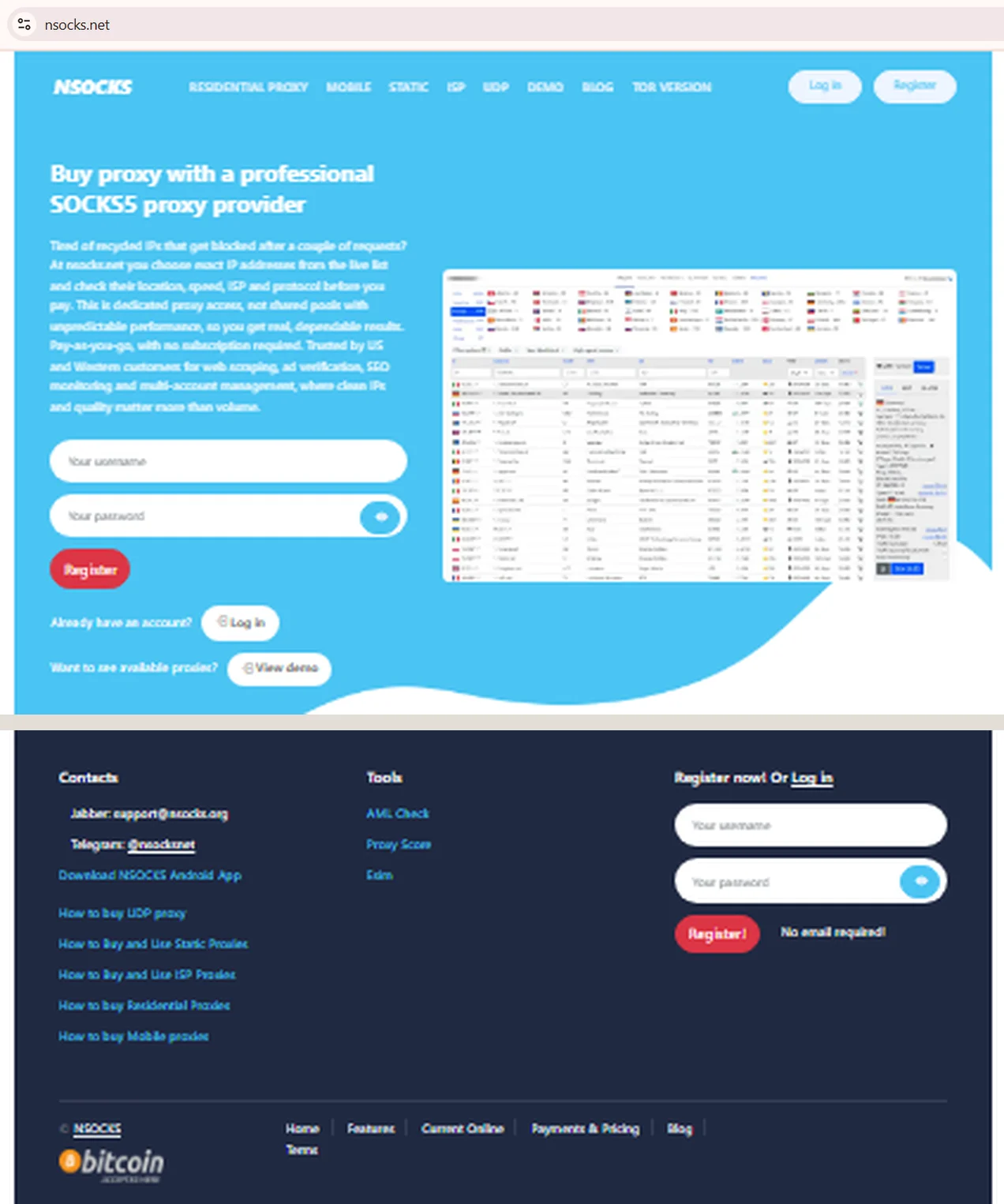
Source: NSOCKS homepage and footer, nsocks.net, screenshot taken 21.08.2026
The address bar reads nsocks.net, and the footer lists the only two support contacts the provider publishes: the Jabber address [email protected] and the Telegram account @nsocksnet. Compare both against whatever page or message you are looking at. A contact that appears nowhere in this footer is not an official channel, whatever it claims.
Why look-alike domains appear in the proxy industry
Copycat domains show up across almost every SaaS niche, and proxies are no exception, since brand recognition has real commercial value. A page borrowing a known name can pull traffic through search or shared links without building any reputation of its own. A page pretending to be NSOCKS would follow that same playbook.
Three drivers explain most of it: cheap domain registration, the ease of copying a homepage layout, and a fresh domain carrying no track record to check against. Some look-alikes are opportunistic parking pages; others chase phishing awareness gaps by mimicking login forms. None of this proves every unfamiliar proxy site is fraudulent, but treating NSOCKS the same way as a bank login page is a reasonable habit either way.
How to verify a proxy website in five checks
Five checks cover almost every situation where a visitor wants to confirm they landed on a genuine proxy provider page rather than a copy. Each one takes under a minute and none needs special software. Running all five together builds a far clearer picture than trusting a single signal.
- Domain and spelling. Read the URL character by character, including the ending. A single swapped letter, extra word or different top-level domain is the most common trick.
- SSL certificate. Click the padlock icon and check the certificate is valid and issued for the exact domain shown, not a related but different address.
- WHOIS lookup. Run a whois lookup through ICANN Lookup or the registrar's own tool to see the registration date and registrar name.
- Support channels. Contact the listed Telegram or Jabber account and compare it against what the homepage shows, since impostor channels rarely match precisely.
- Payment and login page. Before entering an NSOCKS login, confirm the login URL matches the domain already checked, not a redirect elsewhere.
Each check builds on the last, and skipping straight to step five without the first four is how most mistakes happen. Attackers count on that exact shortcut, since a rushed visitor rarely double-checks anything once a familiar-looking form appears right there on screen. That's the moment an NSOCKS login page gets typed into without a second glance.
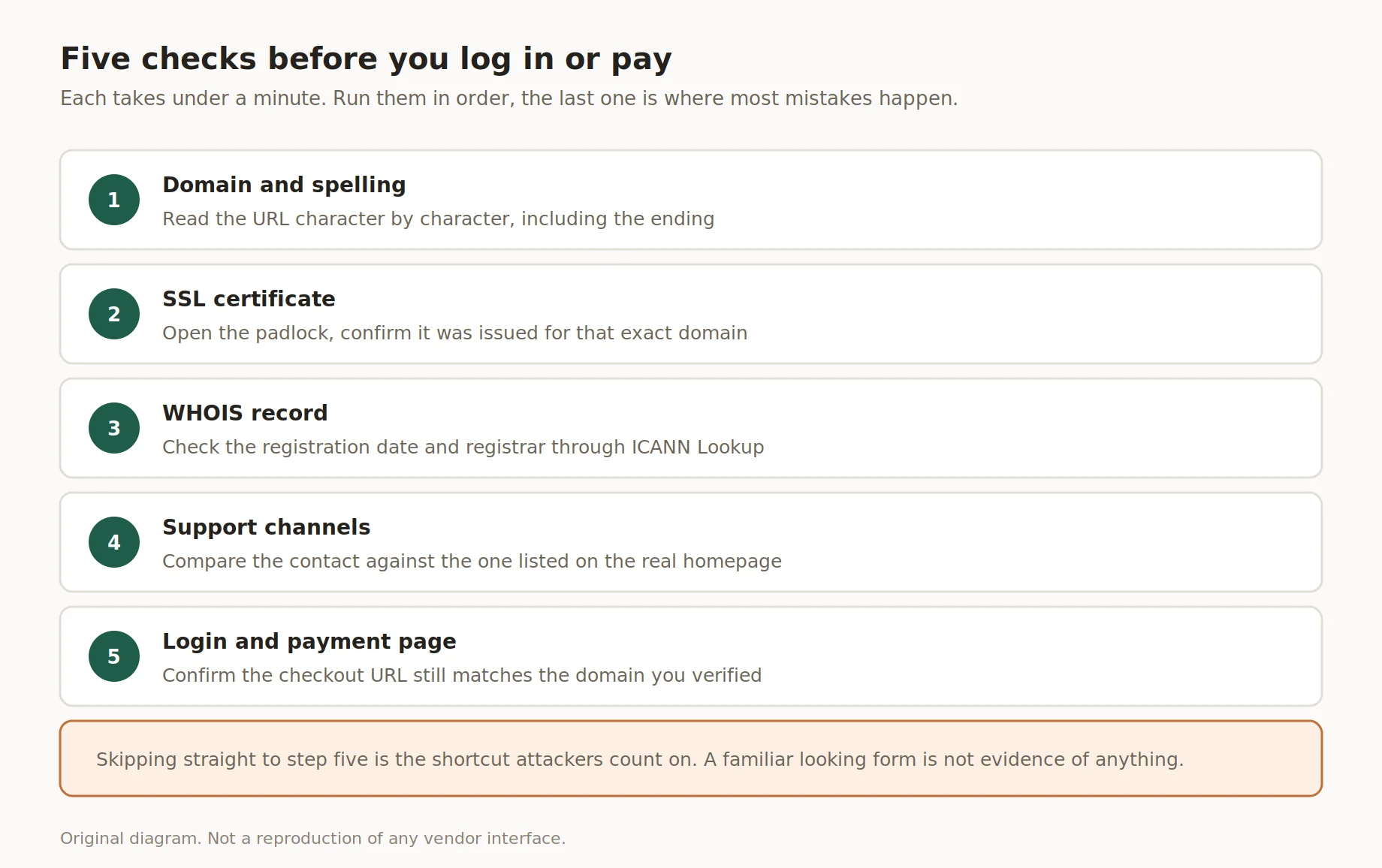
Five checks before you log in or pay
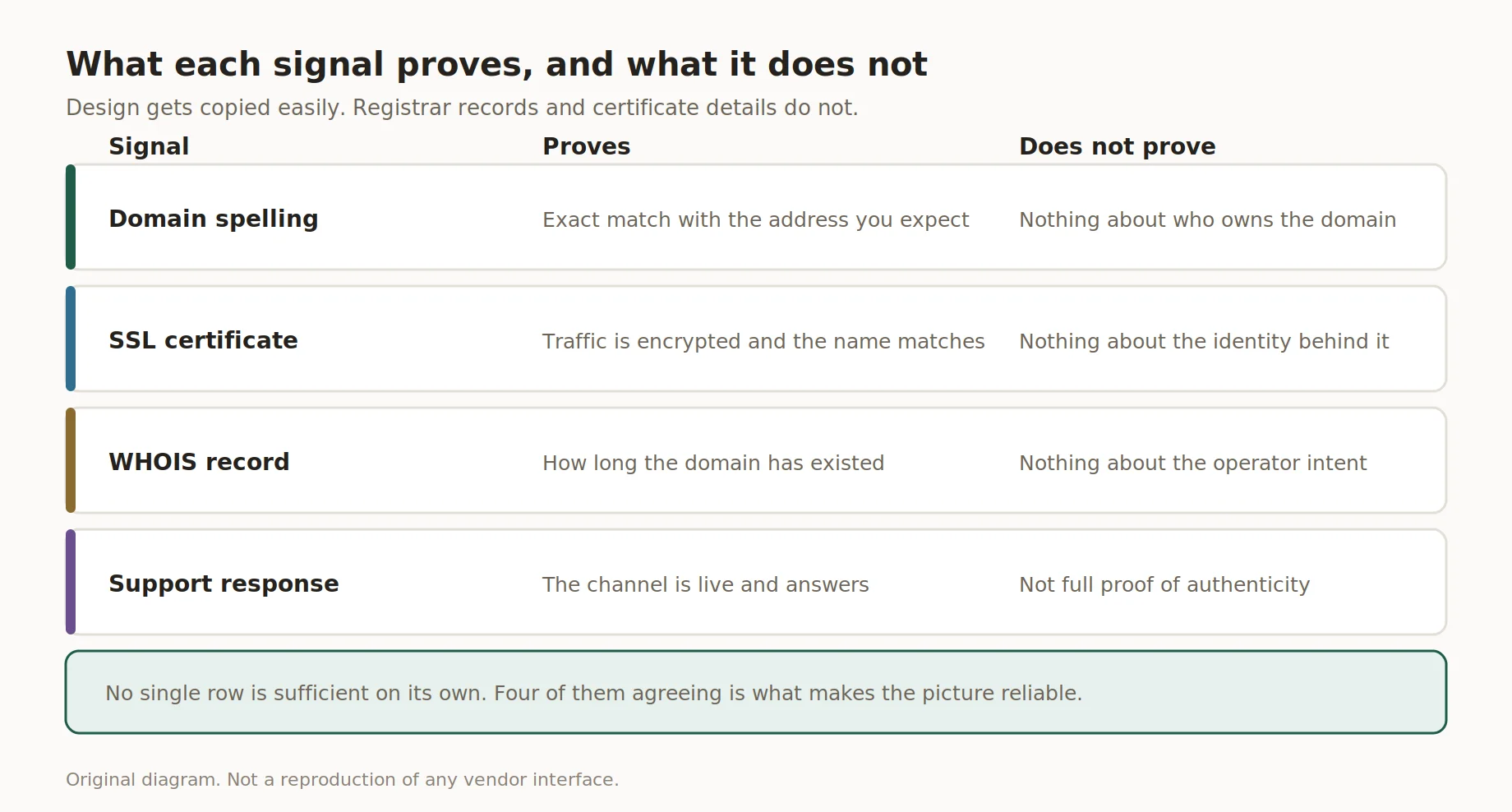
What each signal proves, and what it does not
What each signal actually tells you
No single check proves a site is legitimate on its own, which is why five signals matter more together than any one alone. An SSL certificate confirms encrypted traffic between browser and server, nothing about who runs it. WHOIS data shows how long a domain has existed, which helps but doesn't rule out a recent look-alike.
Combining signals is the point. A matching domain, a certificate issued for that exact address, and a WHOIS record consistent with the brand's history together give a strong picture that this is the genuine NSOCKS proxy provider, not a copy borrowing the name.
| Signal | How to check | What it does and does not prove |
|---|---|---|
| Domain spelling ✅ | Read the full URL in the address bar | Confirms exact match, not ownership history |
| SSL certificate ✅ | Click the padlock, view certificate details | Confirms encryption and domain match, not identity |
| WHOIS lookup ⚠️ | Query via ICANN Lookup or registrar tool | Shows registration date and registrar, not intent |
| Support response ⚠️ | Message the listed channel directly | Shows responsiveness, not full authenticity |
Two of these checks lean heavily on public records rather than appearance, and that's deliberate. Visual design gets copied constantly, but registrar data and certificate details are harder to fake.
Official contact and support channels
Every genuine support channel is linked directly from the homepage on nsocks.net, and none operate outside that set. Messages from unlisted accounts claiming to represent the brand deserve caution. Official replies never ask for a password or card number over chat.
Current official channels:
- ✅ Telegram support account linked from the site footer
- ✅ Jabber contact published on the homepage
- ✅ In-dashboard ticketing system accessible after login
Anyone unsure whether a message is genuine can cross-check the username against the one shown on the live site rather than trusting a screenshot.
Payment and account safety
Payment security starts with the domain check described earlier, since no card number or wallet address should ever be entered before that step is confirmed. Skipping straight to checkout without verifying the address bar is the single most common mistake people make.
💡 Tip: never paste payment details after clicking a link from an email or social message. Type the domain manually, then navigate to the payment page from there. Someone asking whether an NSOCKS proxy purchase is safe is really asking whether the page in front of them is the real one.
Genuine account safety also means treating login credentials like banking details: never shared, never reused across unrelated services.
What to do if you are not sure
A doubt is reason enough to stop, even if nothing on the page looks obviously wrong yet. Is NSOCKS safe to use if something still feels off? Pause before paying or logging in, and run the five checks from earlier rather than guessing. If anything fails to line up, contact support through a channel confirmed on the real homepage, not one supplied by the suspicious page itself.
If payment or login details were already entered somewhere doubtful, four steps limit the damage. First, change the password, using a fresh one not reused elsewhere. Second, enable two factor authentication wherever the account allows it. Third, review recent payment activity. Fourth, contact the card issuer or bank if a transaction looks wrong.
Acting within the first hour matters more than acting perfectly, so don't wait for every detail to be confirmed before starting.
Red flags checklist
A short list of warning signs helps flag a page worth double-checking before entering credentials or payment details. None of these prove fraud alone, but several appearing together is reason to pause, whether the page claims to be NSOCKS or any other proxy brand. This checklist applies broadly across the proxy industry.
| Signal | Why it matters | What to do |
|---|---|---|
| ❌ URL doesn't exactly match the official domain | Most common warning sign | Close the tab, retype the address manually |
| ❌ Urgent pressure to pay immediately | Genuine providers don't rush account decisions | Slow down, verify through official channels |
| ⚠️ Certificate issued for a different domain | Encryption without matching identity | Check the padlock details before continuing |
| ❌ Support only reachable through unlisted contact | Impersonators avoid verifiable channels | Compare against channels listed on the homepage |
A page showing two or more of these signals at once deserves a full stop, not just a raised eyebrow. Nobody running a legitimate proxy business benefits from a visitor feeling rushed, and slowing down for thirty seconds costs nothing next to what a wrong click could cost later.
Running a quick url check whenever something feels rushed takes seconds and avoids most of the trouble entirely, no matter which brand, NSOCKS or otherwise, the page happens to name.
Key takeaways
- The official domain stays fixed over time, and every officially listed channel traces back to that one address, so it's worth bookmarking once and never guessing again.
- Five checks, domain, SSL, WHOIS, support and payment page, cover most of what NSOCKS or any other provider needs for verification.
- Two factor authentication helps regardless of how a login happened, so turn it on before it's needed rather than after.
- Ready to see how genuine proxy access works? Try the demo or register an account directly on the verified domain.
Disclosure and data sources
This article is published by nsocks.net and describes its own official domain and support channels only. Information about these channels comes from the official pages, current as of August 2026. It does not name or assess any third-party website, and readers should reach their own view using the checks above. All trademarks belong to their respective owners, and this block also appears in the site footer.
Frequently asked questions
These are the questions visitors ask most often when confirming a provider's identity. Each answer stands on its own. Together they recap the five checks above.
What is the official NSOCKS domain?
It is nsocks.net. Any address with a different ending or an extra word is not the domain this provider publishes, and the five checks above confirm it in under five minutes.
Does an SSL certificate prove a website is official?
No, it only confirms encrypted traffic and domain match, not who runs the site.
How do I check when a domain was registered?
Run a WHOIS lookup through ICANN Lookup or the registrar's own search tool.
Where can I find the official support channels?
They're linked from the homepage footer, currently Telegram and Jabber contacts.
What should I do if I paid on a website I cannot verify?
Change your password, enable two factor authentication, and contact your bank.
How do I report a suspicious look-alike website?
Reach out through a support channel confirmed on the verified homepage.