Cheap residential proxies: how to pick a budget option
Cheap residential proxies are plans priced low per GB, usually through large shared pools, proxyware-sourced traffic, or aggressive promo pricing. A low sticker price doesn't always mean a low cost per task. This guide covers what pushes the price down, where the IPs come from, and how to compare plans before committing budget.
Legend used in every table below: ✅ documented by the vendor · ❌ not offered or not documented · ⚠️ documented with limits · 💡 practical tip. No other marks are used on this page.
What makes residential proxies cheap
The price of cheap residential proxies mostly comes down to four things: billing method, IP pool size, quality mix inside that pool, and how tight the bandwidth limits run. Providers with large proxyware-sourced pools or steep volume discounts post a lower price per GB than smaller, vetted networks. Billing model matters too: pay-as-you-go traffic behaves differently from a monthly plan with unused data expiring at cycle end. 💡 Tip: a huge pool number says little about how many IPs sit online in your target city right now.
Where cheap residential IPs come from
Best cheap residential proxies trace back to one of three pool models: proxyware apps paying device owners for spare bandwidth, free SDKs bundled into mobile apps, or a reseller layer on top of someone else's network. None of these models is illegal by nature, but the paperwork matters. Look for a statement on device owner consent, a published acceptable use policy, and an opt-out path for anyone contributing bandwidth. If a provider's docs say nothing about pool origin, that silence is itself the answer.
Price per GB vs cost per successful request
Affordable residential proxies on paper aren't automatically cheap in practice, since price per GB ignores failed requests, retries, and blocked sessions. A $2/GB plan at a 70% success rate can cost more per task than a $4/GB plan running at 97%. What matters is cost per successful request: total spend divided by requests that returned usable data. AIMultiple runs continuous benchmarks across ten vendors, a useful reference for success rate.
| Metric | What it shows | Why it matters |
|---|---|---|
| Price per GB | Sticker price on the plan | Ignores failed requests |
| Success rate ✅ | Share of requests returning usable data | Cuts effective cost |
| Cost per successful request | Spend divided by usable results | The figure that matters |
| IP pool size | Total advertised IP count | Useless without diversity |
Most residential proxy providers publish this breakdown on their own pricing page, the first place to verify a number before trusting it.
Cheap residential proxies compared
Five providers made this shortlist because each publishes pricing on its site, keeps its entry plan at or under $10 per GB, and documents supported protocols. NSOCKS sits alongside them as a sixth point, priced per IP rather than per GB. Every price below comes from the provider's own pricing page rather than from a third-party ranking, which is the only way a budget comparison holds up when the numbers move this often.
| Provider | Entry price/GB | Volume tier price/GB | Note | Pool size | Source |
|---|---|---|---|---|---|
| Bright Data | $4.00 at 1 GB | $3.00 at 332 GB | Promo, list $8.00 / $6.00 | 400M+, vendor claim | brightdata.com |
| Oxylabs | $6.00 at 5 GB | $4.00 at 125 GB | List price | 175M+, vendor claim | oxylabs.io |
| Decodo | $3.75 at 3 GB | $2.75 at 100 GB | Regular tab, list price | not published | decodo.com |
| Webshare | $3.50 at 1 GB | $2.25 at 100 GB | Discounted, base $7.00 struck out | not published | webshare.io |
| DataImpulse | $1.00 at 5 GB | $0.80 at 1 TB | List, traffic never expires | not published | dataimpulse.com |
| NSOCKS | Priced per IP | Priced per IP | ✅ ASN & blacklist shown pre-sale | not published | nsocks.net |
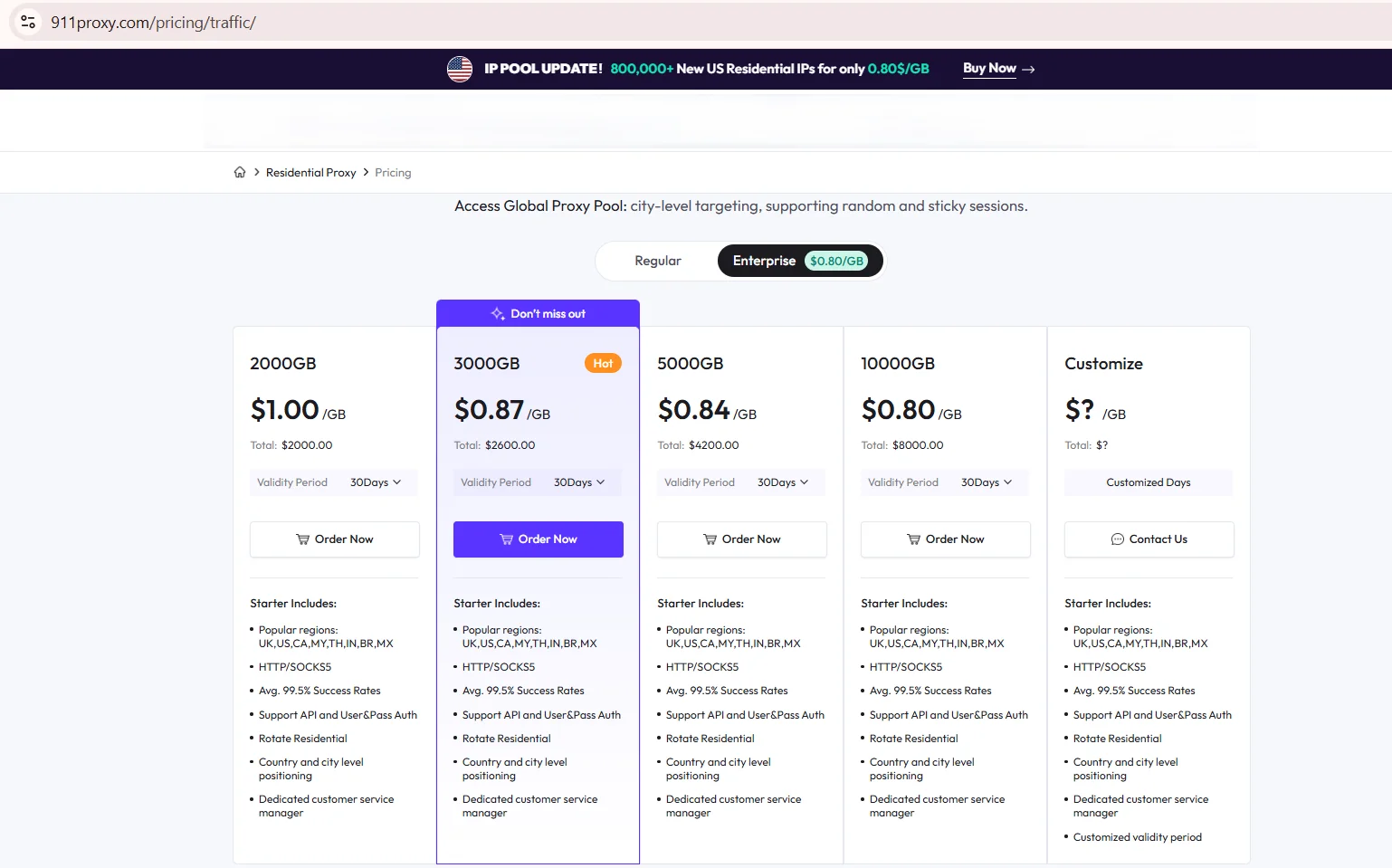
Source: Proxy Networks Pricing, residential tab, brightdata.com, screenshot taken August 2026
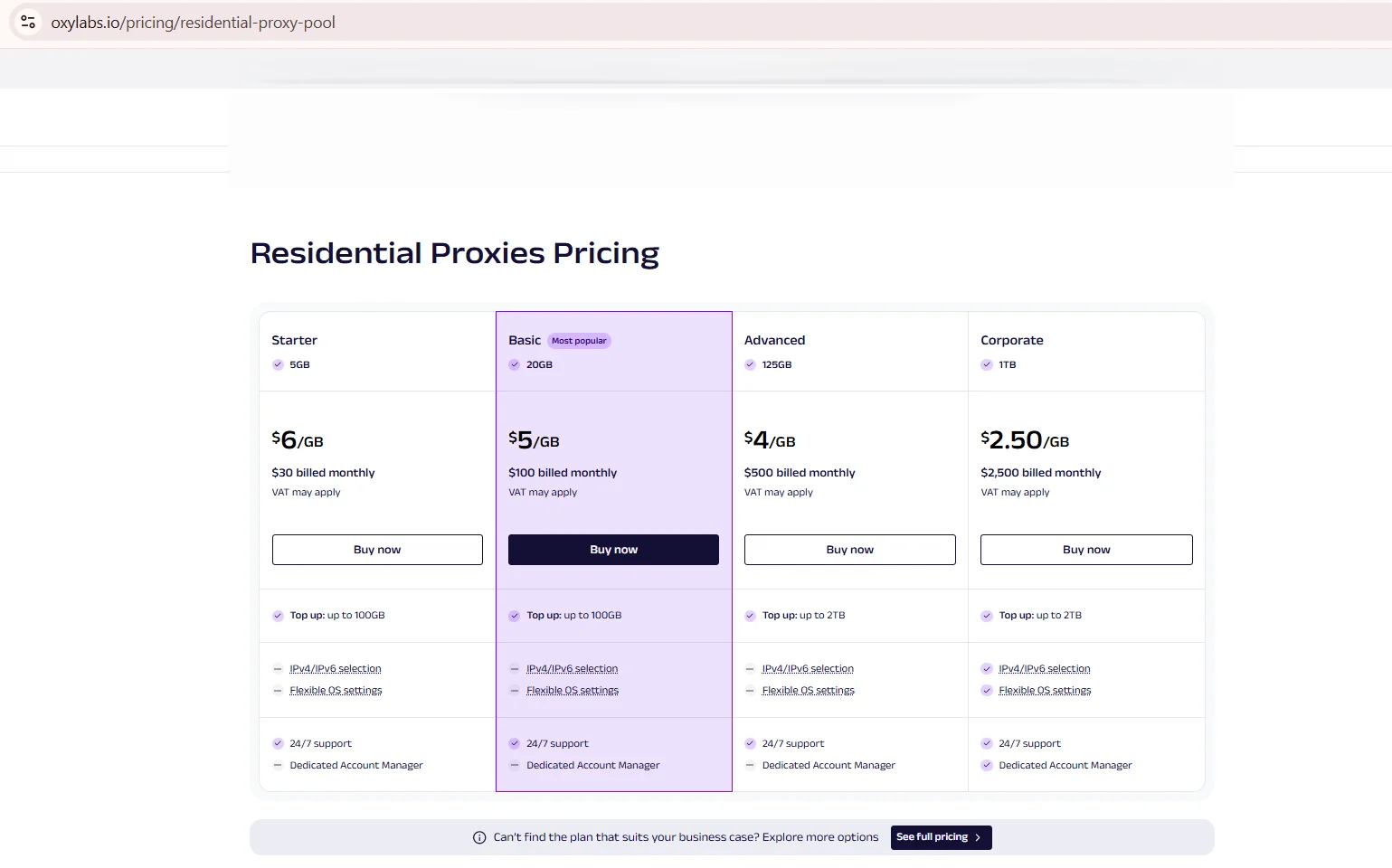
Source: Residential Proxies Pricing, oxylabs.io, screenshot taken August 2026
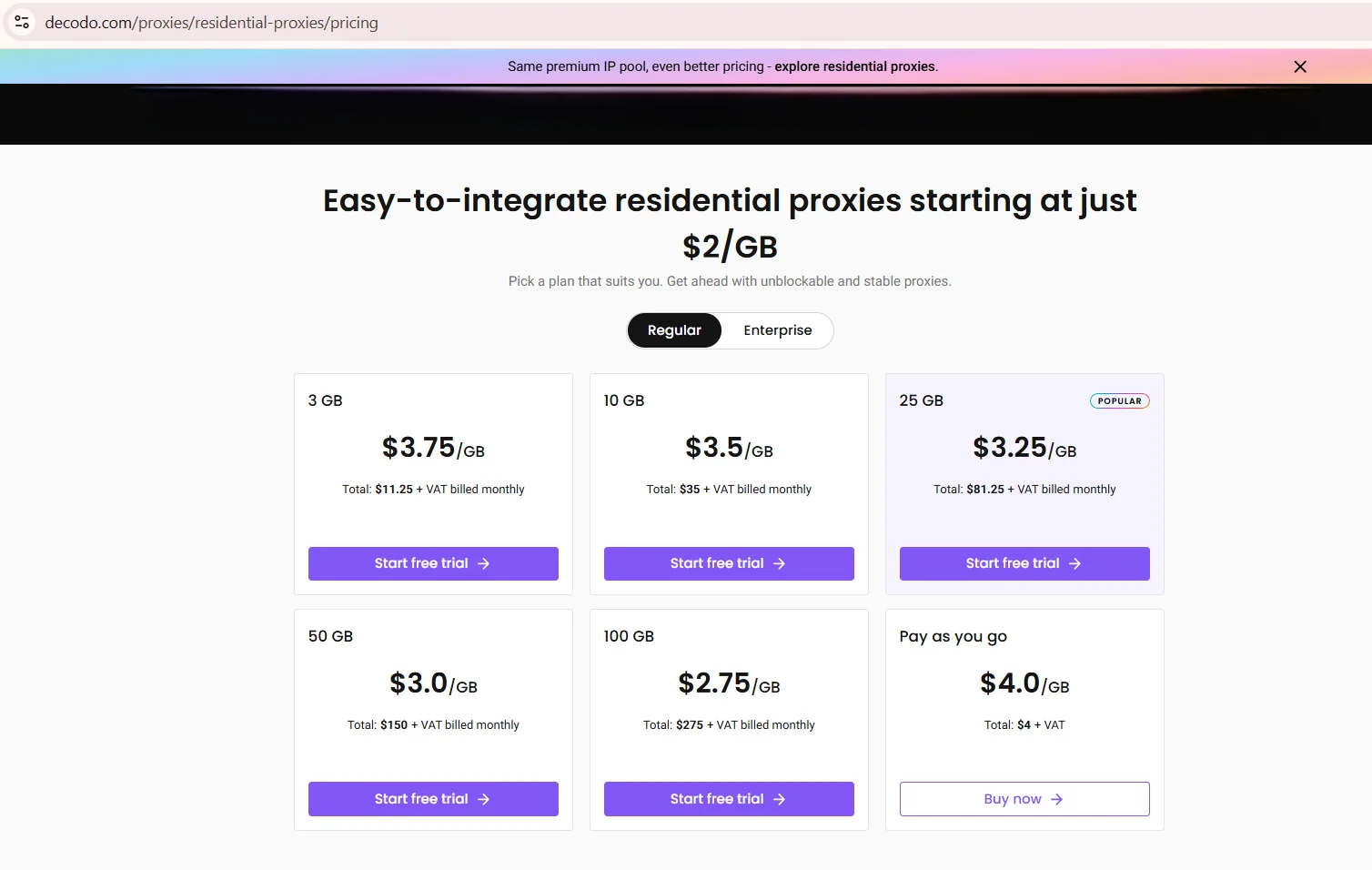
Source: Residential Proxies Pricing, Regular tab, decodo.com, screenshot taken August 2026
DataImpulse prices residential traffic at a flat $1.00 per GB on both the $5 intro plan for 5 GB and the $50 plan for 50 GB, dropping to $0.80 per GB on the 1 TB tier. Traffic never expires on any tier, country targeting is included, and HTTP(S) and SOCKS5 are listed across the range. The same page prices datacenter traffic at $0.50 per GB, mobile at $2.00 per GB and premium residential at $5.00 per GB, which is worth knowing before treating the headline rate as one number.
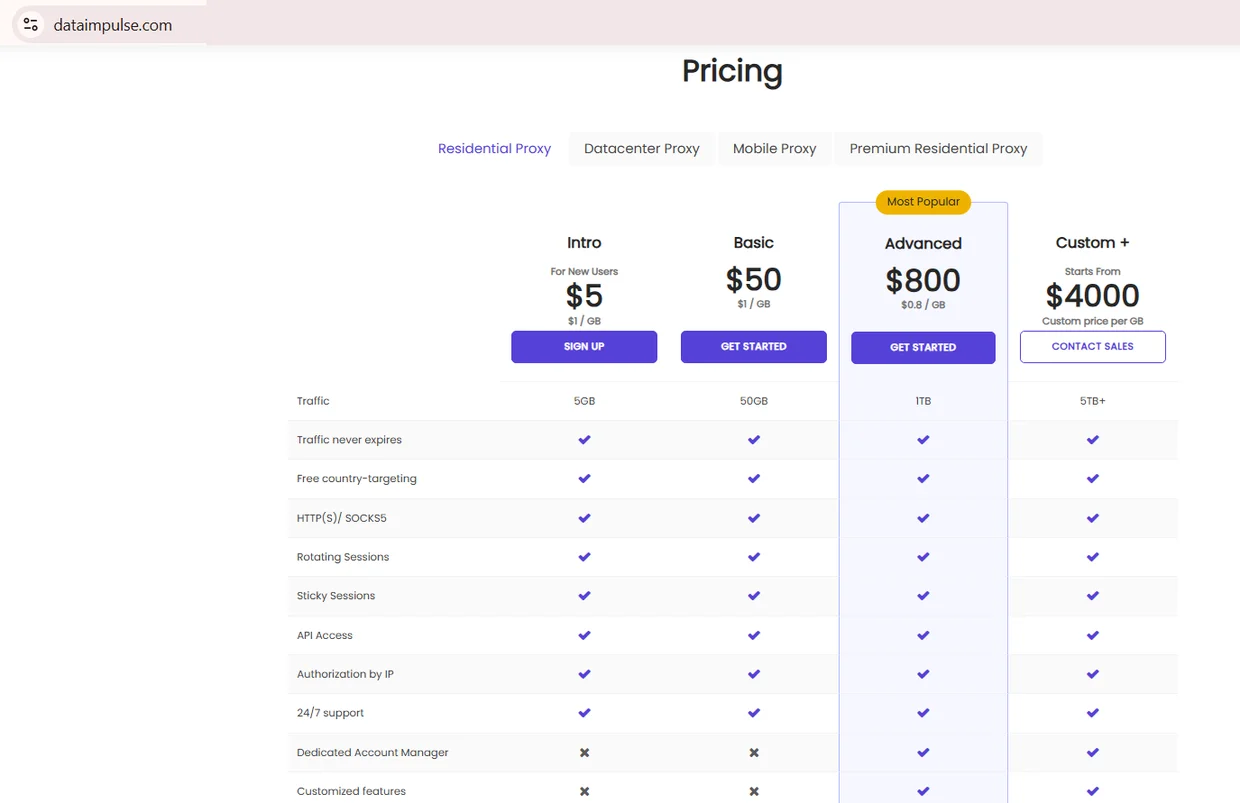
Source: Pricing, Residential Proxy tab, dataimpulse.com, screenshot taken 21.08.2026
Webshare turned out to match the table exactly once the right tab was open: $3.50 per GB on the 1 GB plan and $2.25 per GB at 100 GB, dropping to $1.40 per GB at 3 TB. Every one of those prices is discounted against a $7.00 base shown struck out on the card, with the saving running from 50 to 80 percent by volume, so read the row as a promotional snapshot rather than a standing rate. The same page also sells proxy servers and static residential per proxy, which is why picking the wrong tab makes a per-GB comparison fall apart.
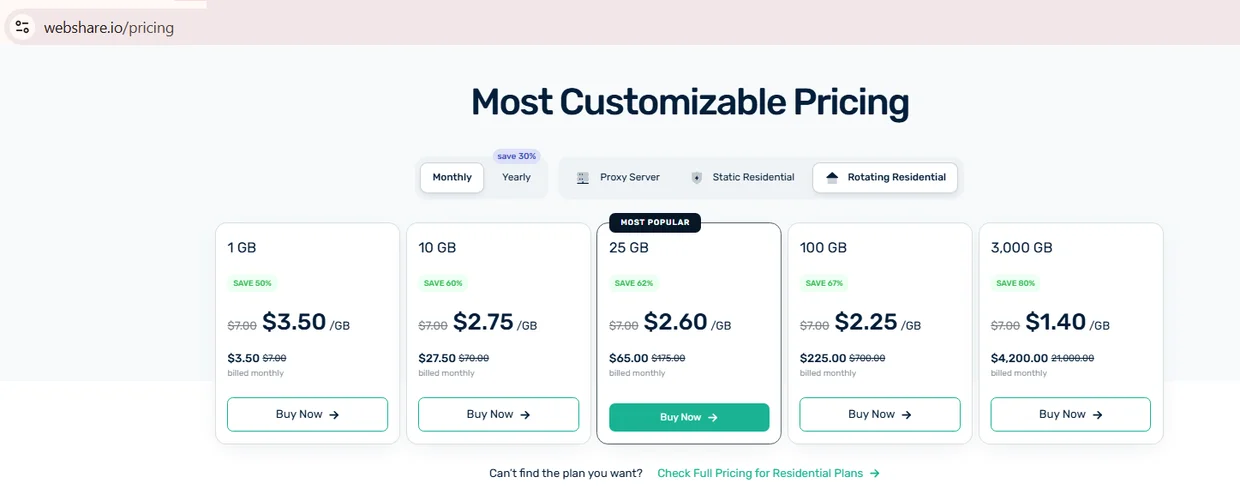
Source: Pricing, Rotating Residential tab, webshare.io, screenshot taken 21.08.2026
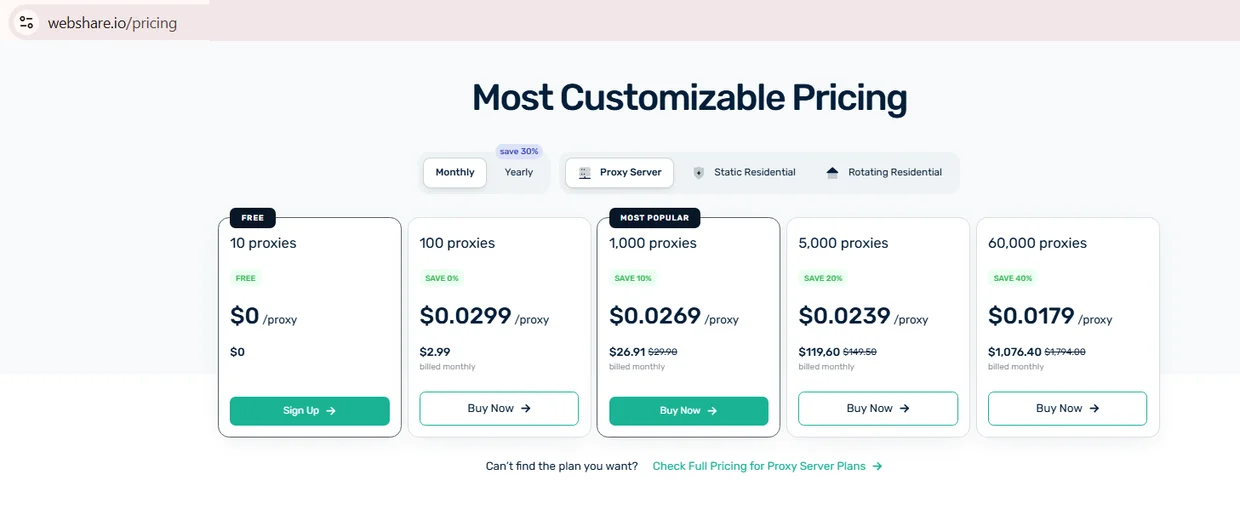
Source: Pricing, Proxy Server tab, webshare.io, screenshot taken 21.08.2026
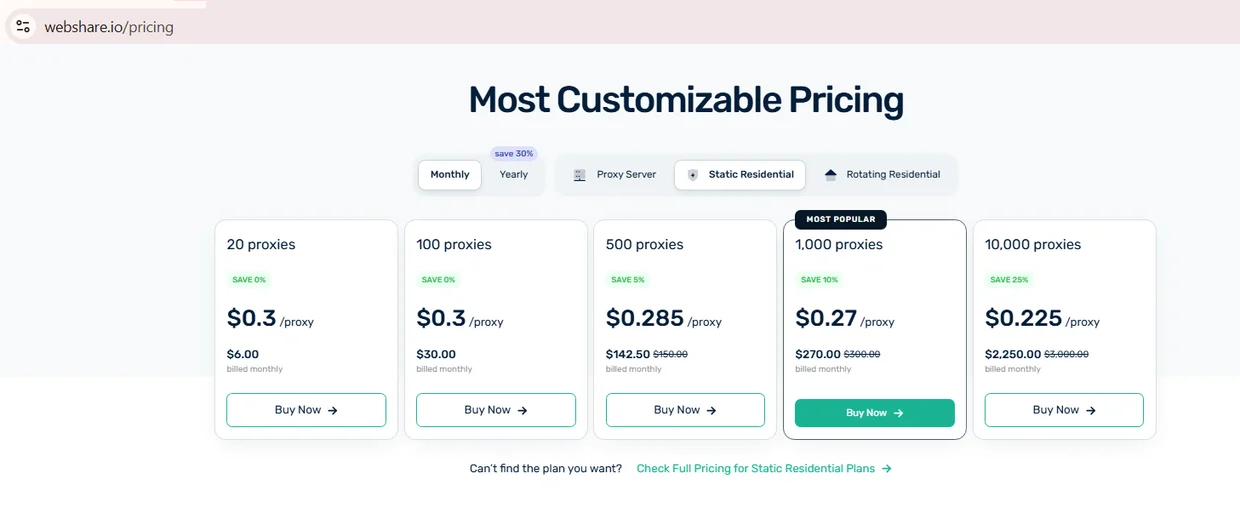
Source: Pricing, Static Residential tab, webshare.io, screenshot taken 21.08.2026
What budget plans cover and what they don't
Budget residential pools handle a specific range of jobs well and struggle outside it. Affordable residential proxies fit tasks where each request is short, the target tolerates occasional failures, and rotation happens automatically. They fall short on long authenticated sessions or ZIP-level geo targeting. Matching the plan to the job avoids paying for a feature you'll never touch.
- ✅ Public data collection from open pages
- ✅ SEO rank and SERP monitoring
- ✅ Ad verification across regions
- ✅ Localization and QA testing
Some workloads sit outside that comfort zone, and it helps to know the boundary before you buy residential proxies for a new use case. A pool built for open scraping can struggle on a task expecting one stable identity.
- ❌ Long authenticated sessions needing one stable IP for hours
- ❌ Sub-city geo targeting requiring ZIP-level accuracy
- ❌ High-security targets with aggressive fraud scoring
Using NSOCKS or any other proxy service means operating within the target site's terms and applicable US law. Legitimate use covers data collection, monitoring, and testing, not account takeover.
Hidden costs to watch for
Sticker price rarely tells the whole story on an affordable residential proxies plan. Unused traffic can expire at cycle end, some plans charge a fee to top up mid-month, and a few set a minimum reload larger than a small project needs. None of this is hidden in bad faith, but it's easy to miss. Reading the fine print once beats chasing the lowest rate on the market.
| Cost | Where it appears | How to avoid |
|---|---|---|
| Traffic expiration | End of billing cycle | Match plan size to real use |
| Top-up fee | Mid-cycle refills | Check refill terms first |
| Minimum reload | Balance top-ups | Compare minimum to your budget |
| Currency conversion | Non-USD billing | Confirm currency at checkout |
Rotation and sticky sessions on budget plans
Rotation control and sticky sessions work differently across cheapest residential proxies plans, and the gap matters beyond a single page fetch. Some providers rotate the IP on every request by default, no sticky option below a certain tier. Others offer sticky sessions but cap the duration far short of a login flow's needs. Check the session length documented for the tier, not the enterprise plan.
- 💡 Confirm sticky sessions are available on the entry tier, not just higher tiers
- 💡 Check the maximum sticky duration on the provider's own page
- 💡 Test rotation on failure: IP change, or the request fails
- 💡 Ask whether rotation control is exposed via API or dashboard only
Plans that skip this kind of documentation are hard to plan a workflow around, so treat missing detail on cheapest residential proxies pages as a real gap worth asking about before signing up.
Day-1 test: check IP quality and measure real cost
Before scaling any budget plan, a short first-day test catches problems a sales page won't mention. Running at least 200 requests against a real target gives enough data to trust the numbers, and recording p50 and p95 latency shows whether slow outliers are rare or common. Best cheap residential proxies earn that label by holding up under this test, not a headline price. The same run produces the numbers for the formula above.
- Pull a sample of IPs and check ASN and IP type via a lookup service.
- Run a blacklist check against two independent databases.
- Verify geo accuracy through an independent geolocation service.
- Send 200+ requests to the actual target site and log failures.
- Record p50 and p95 latency across the full run.
- Divide total spend by successful requests for real cost per result.
Best cheap residential proxies tend to pass this test with a success rate holding above 95% across the full run.
How NSOCKS fits a budget workflow
Disclosure: NSOCKS is our service, and this section describes it directly. The pricing model here differs from a typical shared pool: IPs are priced individually, with ASN, ISP, and blacklist status visible before purchase instead of pulled blind from a pool of unknown quality. That trade means a higher cost per IP for fewer wasted requests on flagged addresses, which is why NSOCKS isn't one of the cheapest residential proxies by sticker price alone. A refund applies when an IP fails its blacklist check, and flagged IPs already in stock sell at a discount. The same model covers residential, ISP, static and mobile lines.
| Feature | What it means in practice |
|---|---|
| ASN & ISP visibility | Buyer sees network origin before paying |
| Blacklist check before sale | Fewer wasted requests on flagged IPs |
| Per-IP pricing | No shared pool of unknown-quality addresses |
| Refund on failed IP | Buyer isn't stuck with a bad purchase |
Teams that want to test this model before committing can start with a demo or a small IP batch through the NSOCKS signup page.
Key takeaways
Cheap residential proxies vary widely once you look past the sticker price. A handful of numbers decide whether a plan is worth it: pool size, success rate, and how price scales at volume.
- Compare cost per successful request, not just price per GB
- Check where the IP pool comes from before buying
- Confirm sticky session limits on the actual entry tier
- Run a day-one test on 200+ requests before scaling
- Match the plan to the job: scraping differs from long sessions
Getting these checks right is what separates a solid cheap residential proxies plan from a wasted one.
Disclosure and data sources
This article is published by NSOCKS. NSOCKS is one of the services listed and we have a commercial interest in it. We are not affiliated with any other provider mentioned; none of them sponsored or reviewed this article. Third-party data was taken from the providers' own pages on August 19, 2026, and may be promotional. All trademarks belong to their respective owners and are used for identification only.
Frequently asked questions
How much do cheap residential proxies cost per GB?
Entry tiers typically run $1-$6 per GB, based on volume and promo pricing.
Is my account at risk on a shared budget pool?
Shared pools can carry other users' history, so check fraud score and past bans first.
Are cheap residential IPs ethically sourced?
Only if the provider documents device owner consent and a clear opt-out policy.
How do I calculate the real cost per successful request?
Divide total spend by the number of requests that returned usable data.
Do budget plans support sticky sessions?
Some do, but duration limits vary, so check the entry tier's documented session length.
Can I start with a small test plan?
Most providers, NSOCKS included, offer a small starting batch to test quality first.