Best antidetect browsers in 2026: feature comparison
This guide compares seven browser tools chosen for public pricing, public automation docs, and active status as of August 2026. Nobody gets ranked as the best Antidetect Browsers pick here, the data sits parameter by parameter for a direct read. An antidetect browser itself lets one operator run several isolated browser profiles, each with its own browser fingerprint, so profiles never link back to a single device.
Legend used in every table below: ✅ documented by the vendor · ❌ not offered or not documented · ⚠️ documented with limits · 💡 practical tip. No other marks are used on this page.
What an antidetect browser does
Running several client accounts from one machine only works if each browser profile stays fully isolated from the others. An Antidetect Browser handles that by isolating cookies, cache, hardware signals, and network settings into separate profiles, so each shows a distinct fingerprint to sites it visits. It is still a modified Chromium or Firefox build, only every profile gets its own storage and hardware values.
Marketing agencies use this to avoid shared-signal flags on client ad accounts. QA teams rely on the same isolation to test site behavior across systems and locales.
💡 A profile mixing settings from two environments looks more inconsistent than one built around a single device.
Antidetect browser vs regular browser with a proxy
A regular browser with a proxy changes only the IP; every other signal stays the same across tabs. An Anti Detect Browser changes both layers at once: the address through a proxy, the fingerprint through profile isolation. That gap matters for anyone running more than one account from a shared network, since one leaked fingerprint can tie profiles together even when IPs differ.
Testing this difference costs nothing on a trial tier before committing to a paid plan. Trying an Antidetect Browser free plan for a week is usually enough to see whether fingerprint isolation is even needed for a given workflow, or whether a plain proxy already covers it.
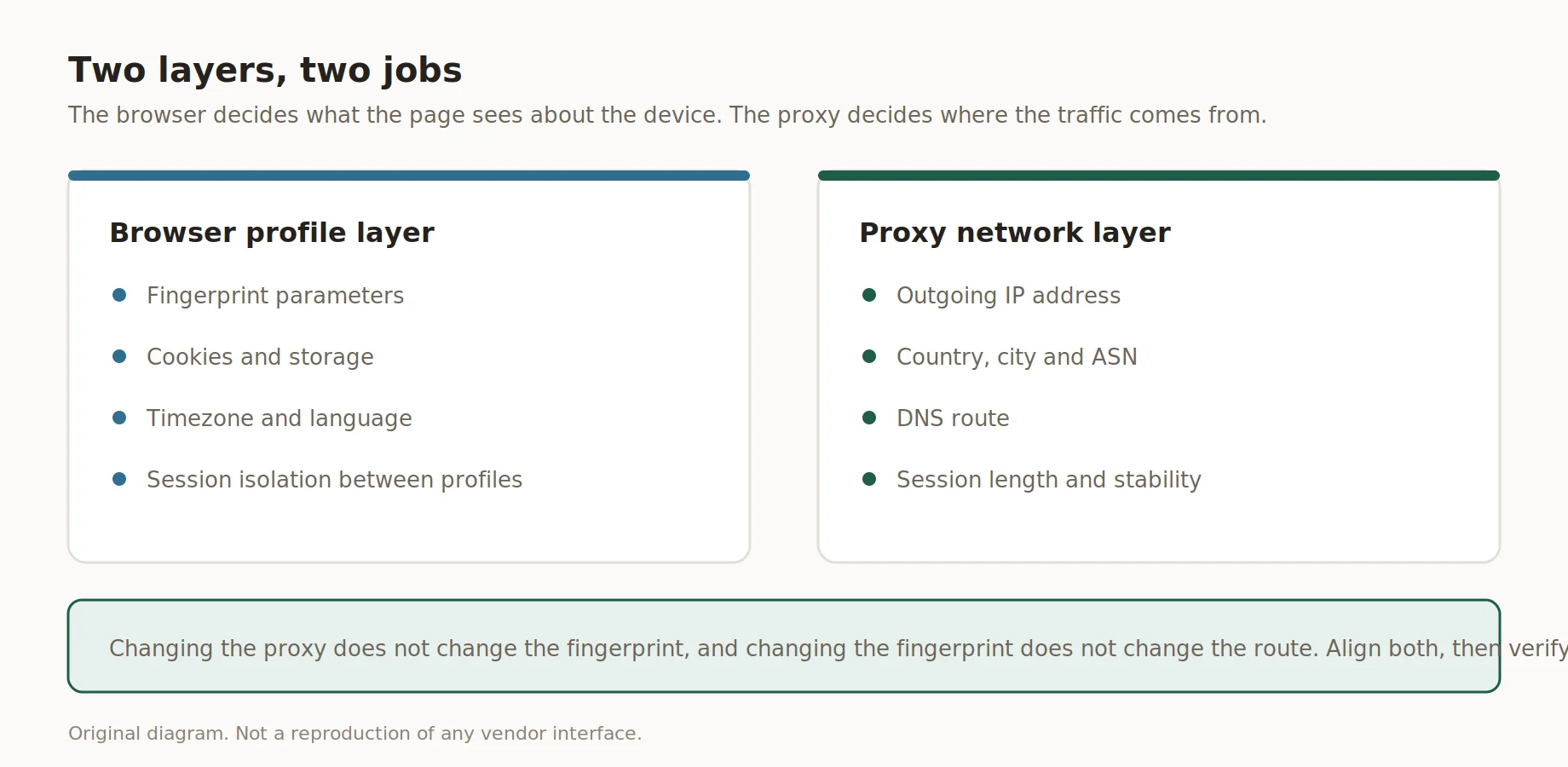
What the browser controls and what the proxy controls
Antidetect browsers compared
Picking the right option comes down to three questions: profile count on the entry plan, documented automation, and what the entry price buys. The table lines up seven tools by the same criteria, taken from each vendor's own pricing page and captured in August 2026. Each price column shows the monthly rate first and the discounted annual rate second, because six of the seven pages open on an annual tab by default with twenty to fifty percent already applied, and comparing one of those figures against a monthly one gives a misleading gap. A few vendors also list cloud profiles for syncing across devices, worth checking separately from the base plan.
| Browser | Engine | Profiles on the entry plan | Team seats | API | Entry price |
|---|---|---|---|---|---|
| GoLogin | Orbita | 10, 50 or 100 on the entry plan | Members from the Business plan | REST API documented | $9/mo, $4.50 annually |
| Multilogin | Mimic, Stealthfox | Free plan 5, Pro 10 to 50 | 2 seats on Pro, unlimited on Business | API on Pro and above | Free, Pro $12.42/mo billed yearly |
| AdsPower | SunBrowser | Free 2, Professional 10 to 100 | Members as a paid add-on | RPA and API | $9/mo, $7.20 annually |
| Kameleo | Chrome, Firefox | Free 2 concurrent browsers, Startup 10 | 3 members on the free plan | Playwright documented | Free, Startup €45/mo billed yearly |
| Octo Browser | Chromium | Lite 3, Starter 10 of 30 | Team members from the Team plan | API from the Base plan | €10/mo, €7 annually |
| Incogniton | Chromium | Starter Plus 10 | 3 seats from Professional | Selenium and Puppeteer | $19.99/mo, $11.99 yearly |
| Dolphin Anty | Chromium | Starter 20 | Additional users as a paid add-on | Playwright documented | $10/mo, $6 for 12 months |
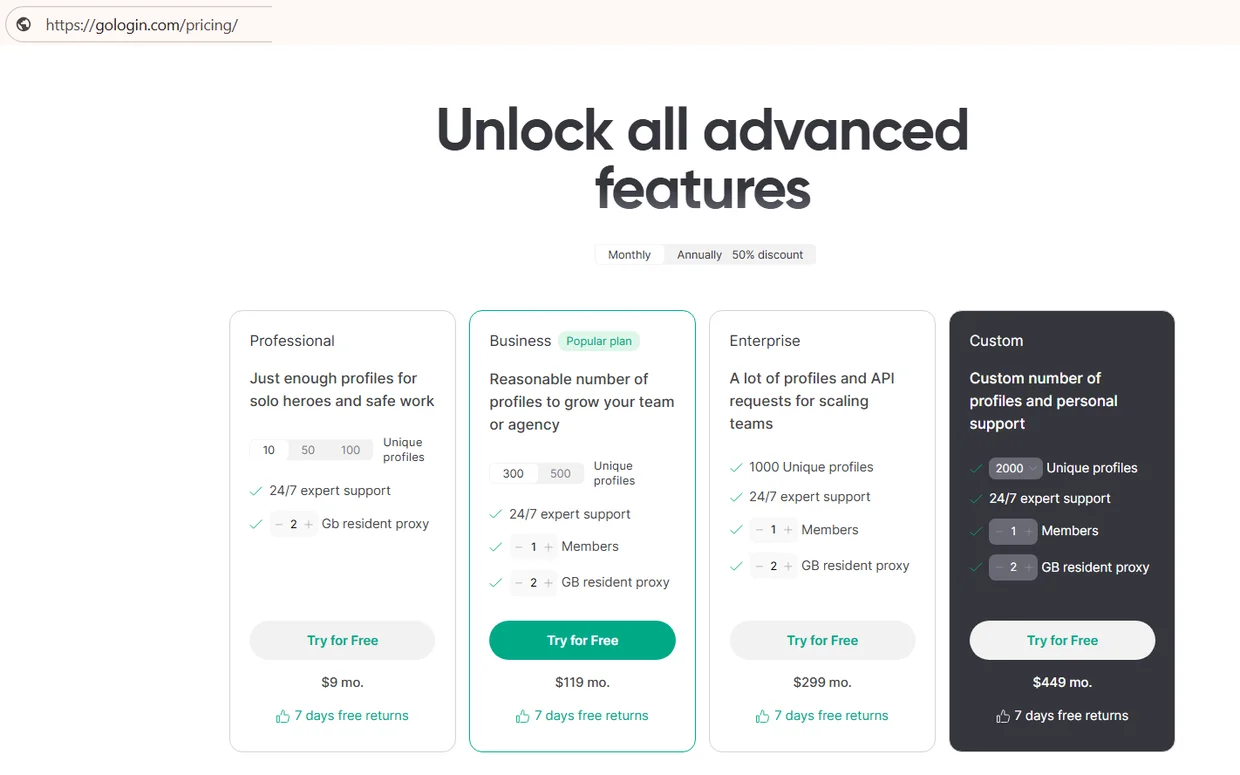
Source: Pricing, monthly tab, gologin.com, screenshot taken 21.08.2026
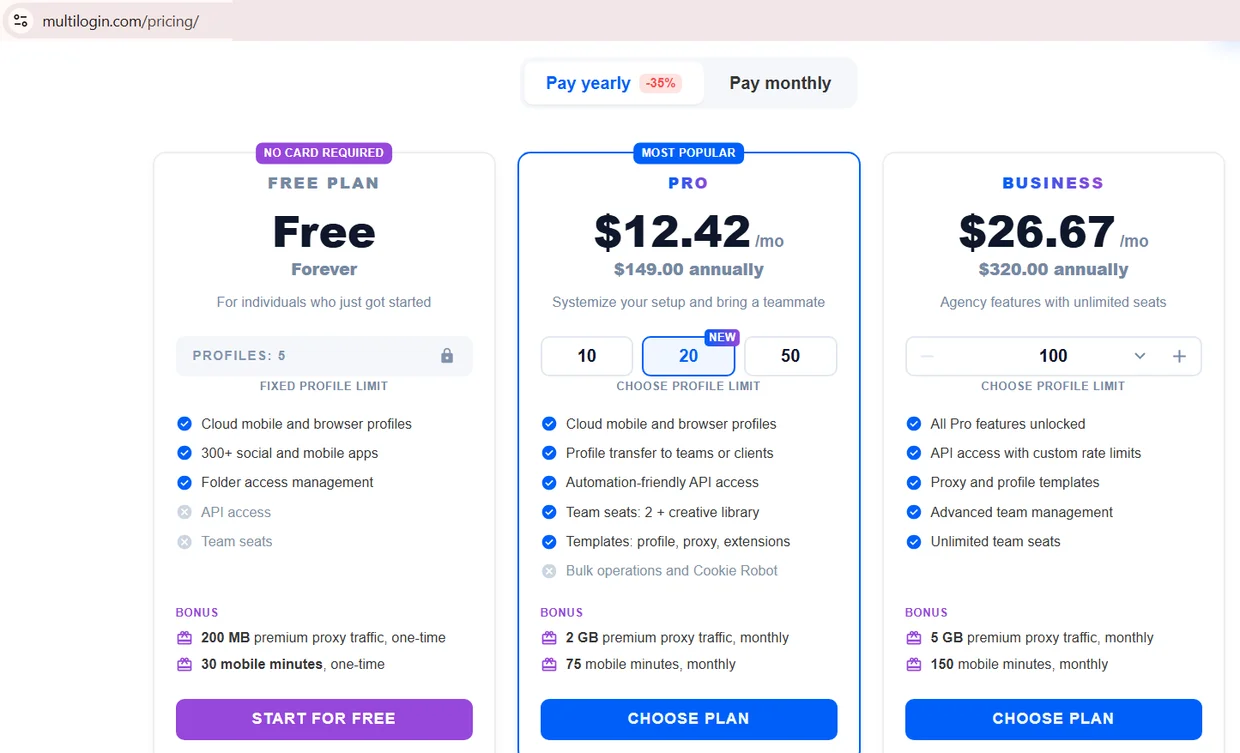
Source: Pricing, yearly tab, multilogin.com, screenshot taken 21.08.2026
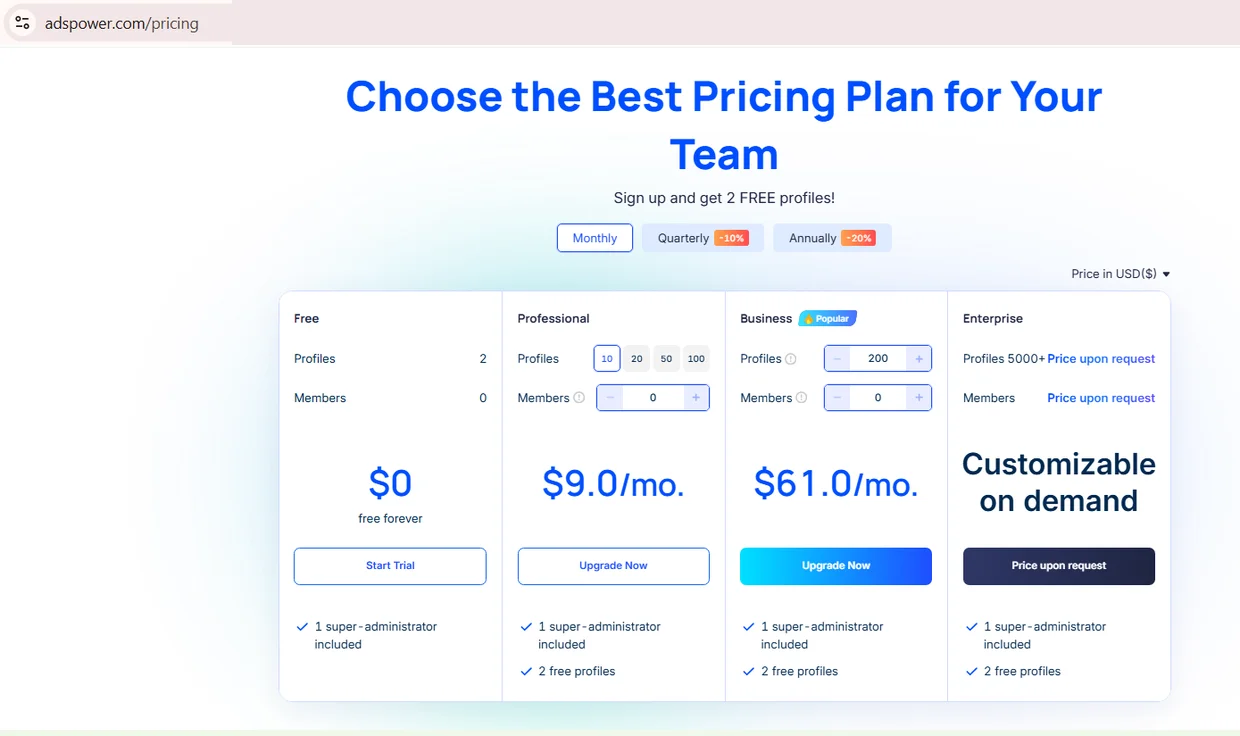
Source: Pricing, monthly tab, adspower.com, screenshot taken 21.08.2026
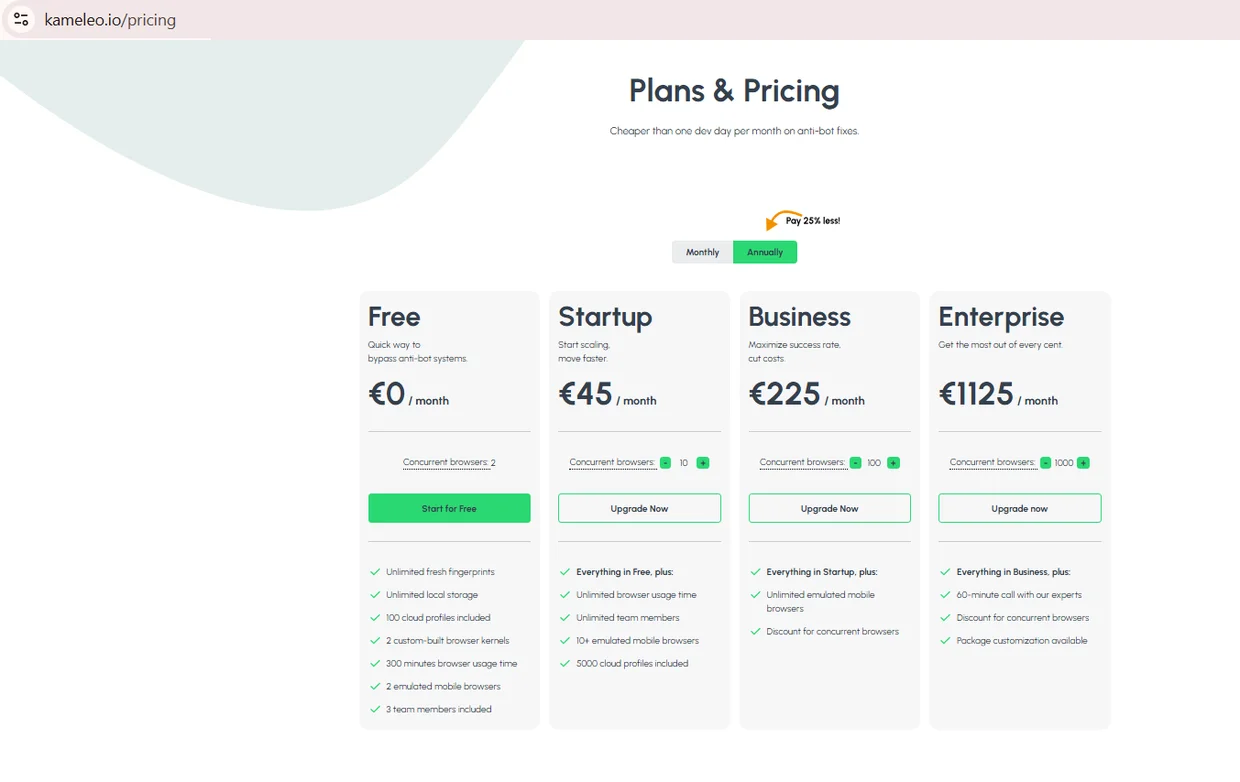
Source: Plans and Pricing, annual tab, kameleo.io, screenshot taken 21.08.2026
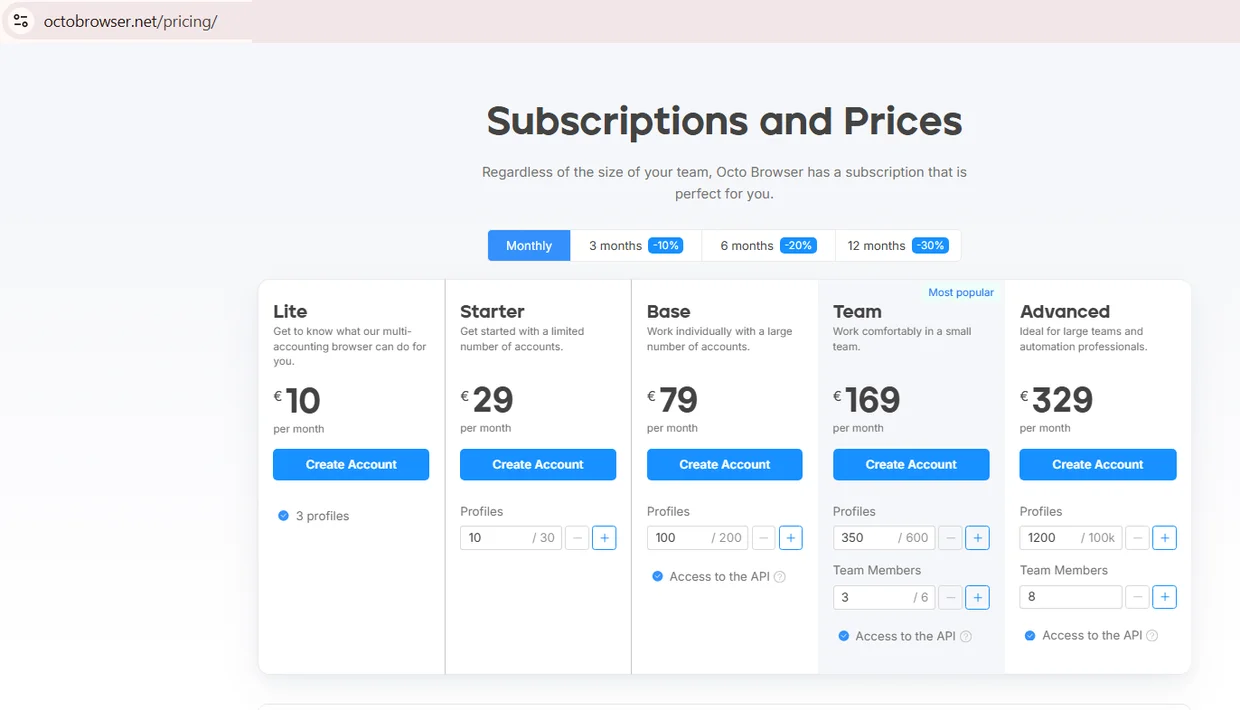
Source: Subscriptions and Prices, monthly tab, octobrowser.net, screenshot taken 21.08.2026
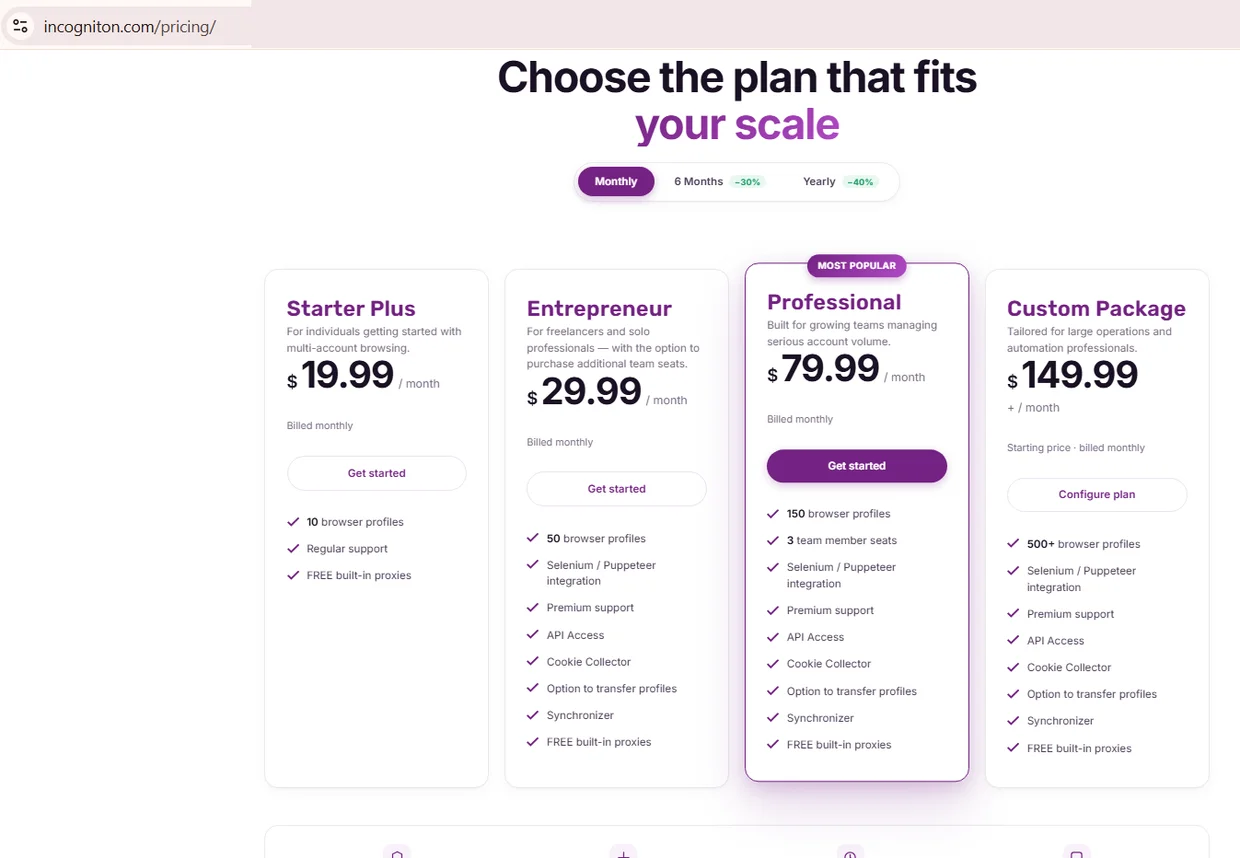
Source: Pricing, monthly tab, incogniton.com, screenshot taken 21.08.2026
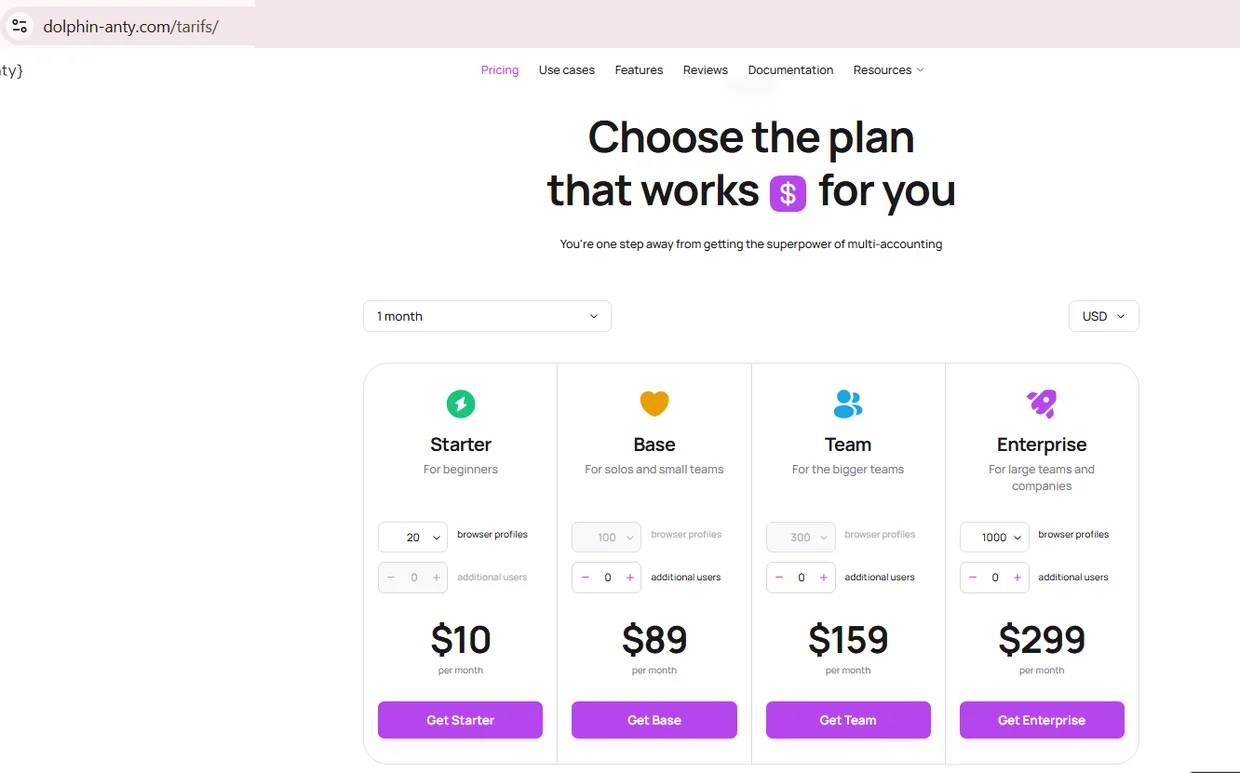
Source: Pricing, one month tab, dolphin-anty.com, screenshot taken 21.08.2026
A best Antidetect Browsers shortlist built from this table holds up even after a vendor quietly changes its pricing page. Reading the vendor's own docs alongside it catches anything the table missed.
Fingerprint control and what is actually configurable
The number of parameters advertised matters less than internal consistency inside one profile. Fingerprint control on a multi profile browser only pays off if a profile claiming a Windows 11 device never shows a mobile GPU string alongside it. Core signals worth checking are canvas fingerprinting, webgl parameters, fonts, audio context, and user agent client hints.
Most vendors document fingerprint scope inside help pages, not pricing pages, which makes claims hard to verify from a landing page alone. An Antidetect Browser documenting all five signals in one place saves time over hunting through scattered release notes.
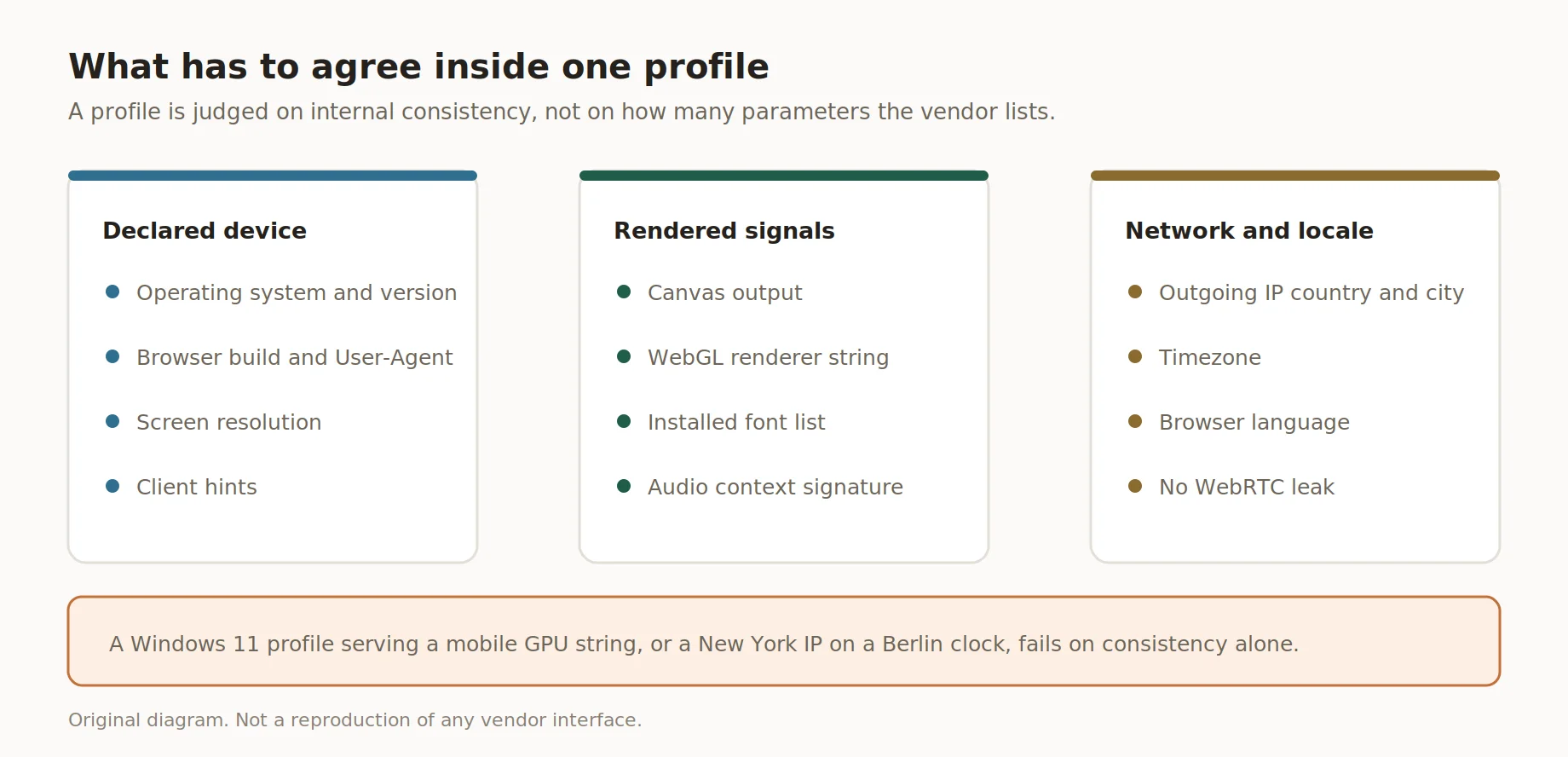
What has to agree inside one profile
| Parameter | What it controls | Where documented |
|---|---|---|
| Canvas fingerprinting | Rendered pixel output | Help center |
| WebGL parameters | GPU renderer strings | Fingerprint docs |
| Fonts | Installed font list | Settings guide |
| Audio context | Audio stack signature | Fingerprint FAQ |
| Client hints | Browser, platform data | Chromium docs |
Automation support and team management
Selenium remains the most broadly supported framework here. Automation on a multi profile browser almost always connects through a local automation API endpoint tied to one profile at a time, whether that's Selenium, Puppeteer, or Playwright. Playwright support stays patchier, worth confirming in the docs first.
Team management sits on top of automation, letting an agency assign roles, share profiles, and pull a log of who launched what. Not every plan bundles both; several vendors gate API access and seats behind a mid tier.
An Anti Detect Browser that documents Selenium support usually exposes Puppeteer too, though Playwright coverage still lags on a few entry plans.
Free plans and trials
Solo testing before a real rollout rarely needs more than a handful of active profiles running at once, and that is exactly what most free tiers on the market are built to cover, nothing more than that. A quick look at each vendor's limits saves a surprise later. An Antidetect Browser free tier caps at two to five profiles on the pages captured here, useful for testing a workflow but not for running a real team operation.
Only Kameleo bundles team members into its free plan, three of them; the rest keep seats behind a paid tier, so a solo tester starts free while a team pays from day one. An Antidetect Browser alone, free or paid, still needs a matching proxy behind it for most real workflows.
| Product | Free tier | Limits |
|---|---|---|
| GoLogin | Not shown on the pricing page | Seven day free returns instead |
| Dolphin Anty | Not shown on the pricing page | Starter is the cheapest paid plan at $10/mo |
| Incogniton | Not shown on the pricing page | Starter Plus is the cheapest paid plan |
| AdsPower | 2 profiles, free forever | 0 members, no collaboration |
| Multilogin | Free plan, 5 profiles forever | No API, no team seats |
| Kameleo | Free plan, 2 concurrent browsers | 100 cloud profiles, 3 team members |
Checking this list takes less time than setting up a single test profile from scratch. A best Antidetect Browsers shortlist worth trusting weighs these free-tier limits before it weighs the price.
How proxies pair with antidetect browsers
Getting this pairing wrong quickly makes a clean profile look inconsistent. Proxy integration relies on timezone matching between the proxy's country and city and the profile's declared timezone and browser language on every launch. A New York IP paired with a Berlin timezone stands out immediately to most detection systems.
A best Anti Detect Browser setup treats this as a routine check, not optional, before any account gets used for real work. WebRTC protection still needs its own separate test too, since a leaking connection can expose the real IP address while the visible proxy IP still looks correct.
How to test an antidetect browser correctly
Fifteen minutes and no paid tools cover the basics of a proper test. The goal is catching inconsistencies before a real campaign runs on top of a broken profile. Running this on an Antidetect Browser free trial first keeps the whole check cost-free.
- Create a profile and set OS, browser version, and screen resolution to a real device.
- Connect a residential or mobile proxy and confirm the IP's country matches timezone and language.
- Run the profile through a free fingerprint checker for canvas, WebGL, font consistency.
- Confirm no WebRTC protection leak by comparing the reported IP with the real one.
- Launch the workflow and record the result before scaling to more profiles.
Vendors patch fingerprint modules often enough that a best Anti Detect Browser profile passing today can fail the same check next month. Running this checklist once after setup still catches most problems early, and it is worth repeating after any major update.
Common mistakes
Most process failures trace back to setup habits, not the software itself. Teams that skip fingerprint verification after setup run into blocks weeks later. Fixing this rarely needs a different best Antidetect Browsers plan, just a five-minute check before launch.
- ❌ Skipping the timezone and language match between proxy and profile.
- ❌ Choosing a plan without checking automation docs first.
- ❌ Reusing one proxy across multiple profiles at once.
- ❌ Ignoring WebRTC protection checks after browser updates.
- ❌ Mixing device signals, like a desktop agent paired with mobile fonts.
Reusing one proxy IP across several Anti Detect Browser profiles at once defeats the entire point of isolation, yet it remains the single most common slip on this list. A quick audit right after any vendor update usually catches the rest before they cost an account.
How NSOCKS proxies integrate
Disclosure: NSOCKS is our service, and this section covers how our proxies work alongside third party antidetect browsers, not a review of any vendor listed above. For profile work we sell static residential proxies with a fixed address per profile. Each proxy ships with location data down to city level, which makes timezone and language matching easy on a multi profile browser running many accounts at once, without extra lookup steps on the vendor side.
Rotating and session options both work fine with the automation APIs listed earlier in this comparison. NSOCKS also connects through standard HTTP and SOCKS5 endpoints that most vendors already support without any extra setup. That compatibility matters more once automation enters the picture. An Anti Detect Browser paired with the wrong proxy pool still leaks through timezone mismatches, regardless of how good the fingerprint layer looks.
| Feature | What it means in practice |
|---|---|
| City-level targeting | ✅ matches profile location to real proxy location |
| SOCKS5, HTTP support | ✅ works with automation APIs, proxy managers |
| Residential, ISP pools | Residential for rotation, ISP for a fixed login IP |
Teams ready to test this can try a demo list or register for full access. Using NSOCKS proxies, you confirm you apply them within current United States law and each platform's terms of service.
Key takeaways
Comparing seven tools side by side shows the best pick depends on team size and automation needs, not on a single universal winner. Any best Anti Detect Browser shortlist should weigh automation support alongside price, not price alone. Free tiers suit solo testing well, but any team operation needs a paid plan budgeted from the start.
- ✅ Profile isolation, not just an IP change, is what separates a browser fingerprint tool from a proxy-only setup.
- ✅ Entry plan profile counts vary widely, from 3 up to unlimited local profiles.
- ✅ Automation support concentrates around Selenium, Puppeteer, and Playwright.
- ✅ Free plans suit testing, not team operations, since none include entry-tier seats.
- ✅ Matching proxy location, timezone, and language stays the top source of inconsistency.
Weighing a best Antidetect Browsers shortlist against these five points before signing up beats discovering a gap after paying. It also makes the next contract renewal a lot less stressful.
Disclosure and data sources
This article is published by NSOCKS, and everything below should be read with that in mind. We sell proxies and have a commercial interest in the proxy section of this piece. We are not affiliated with any Antidetect Browser mentioned; none of them sponsored or reviewed this article. Product data came from vendors' own documentation and public pricing pages on August, 2026, and may change. All trademarks belong to their owners, used here for identification only.
Frequently asked questions
The questions below cover what comes up most when teams compare antidetect browser options against a plain proxy setup. Each answer stays short and factual, without ranking any vendor. For deeper detail, check that vendor's documentation pages linked earlier in this piece. Pricing and free tier limits shift a few times a year, so confirm current numbers first.
What is an antidetect browser used for?
Managing several browser profiles for different accounts or test environments without cross-linking their fingerprints.
Do I still need a proxy with an antidetect browser?
Yes, profile isolation covers the fingerprint layer only, not the IP address itself.
Are there free antidetect browsers?
Several vendors offer free tiers with two to ten profiles, though team features are usually paid-only.
Which proxy type works best with browser profiles?
Residential proxies suit rotating sessions, ISP proxies suit logins needing one fixed IP.
Can antidetect browsers be automated?
Most support Selenium, and many also support Puppeteer or Playwright through a local API.
How do I check that a profile has no leaks?
Run a free fingerprint checker and compare the reported IP against the real connection IP.