Best mobile proxies: how to compare 4G and 5G providers
Mobile proxies route traffic through an IP a carrier assigned to a SIM card, not a data center or home router. Businesses use them for ad verification, app testing and checking how local content renders in a region. The market for the best mobile proxies splits into two models that don't compare side by side: dedicated modem rentals and shared carrier pools. This guide compares them on technical grounds, not marketing.
Legend used in every table below: ✅ documented by the vendor · ❌ not offered or not documented · ⚠️ documented with limits · 💡 practical tip. No other marks are used on this page.
What mobile proxies are and how carrier networks work
A mobile proxy assigns a request the IP of a SIM on a 4g lte network or a 5g network. Carriers place subscribers behind carrier grade nat, so one public IP often serves many phones at once. That's a side effect of how operators conserve IPv4 space, not a trick by mobile proxy providers. Platforms apply lighter IP limits to mobile ranges since blocking one carrier IP affects many users.
Legitimate use includes ad verification, app testing on 4G proxies and newer builds, and checking local search results per state. 💡 Keep any test inside platform terms and US law.
Dedicated modem vs shared carrier pool
Two business models dominate this market and aren't directly comparable. A dedicated modem rents a modem tied to one SIM, so the buyer gets one exclusive IP, billed by day or device. A shared carrier pool pulls from millions of IPs across a larger base, billed by gigabyte, rotating across many users. Picking the best mobile proxy means matching the model to the job first, price second.
| Model | How it works | What to verify |
|---|---|---|
| Dedicated modem | One modem, one SIM, one exclusive IP | Uptime, replacement policy, per-day price |
| Shared carrier pool | Millions of IPs, changes with rotation settings | ✅ pool size, ⚠️ rotation limits, users-per-IP |
Few providers publish how many subscribers share one exit IP, the number a buyer never sees. ❌ Not disclosed on the pages checked for Bright Data, Decodo or Oxylabs. Ask the mobile proxy providers you're evaluating directly if that figure matters for your workload.
Mobile proxy providers compared
Six providers appear here: Bright Data, Decodo, Oxylabs, Byteful, Coronium and NSOCKS, picked because each publishes at least some tariff or feature data. Data as of August 2026. Figures below come from each provider's own site or, where marked, an independent test; reseller posts shaped the structure only, never the numbers, the same way we source every best mobile proxies comparison here.
| Provider | Service model | Network | Countries | Protocols | Billing |
|---|---|---|---|---|---|
| Bright Data | Shared carrier pool | 4G LTE, 5G | 195+, vendor claim | HTTP(S), SOCKS5 | Per GB |
| Decodo | Shared carrier pool | 3G, 4G LTE, 5G | 160+ locations, 700+ carriers | HTTP, SOCKS5 | Per GB |
| Oxylabs | Shared carrier pool | 3G, 4G LTE, 5G | 140+, vendor claim | HTTP(S), SOCKS5 | Per GB |
| Byteful | Not published | Not published | Not published | Not published | Not published |
| Coronium | Dedicated modem | 4G, 5G | USA pages list Florida, New York, Texas and Los Angeles | HTTP(S), SOCKS5 | Per day, week or month, unlimited bandwidth |
| NSOCKS | Shared carrier pool | 4G LTE, 5G | US focused, count not published | SOCKS5, SOCKS5 UDP | Per IP, 24 hours, pay as you go |
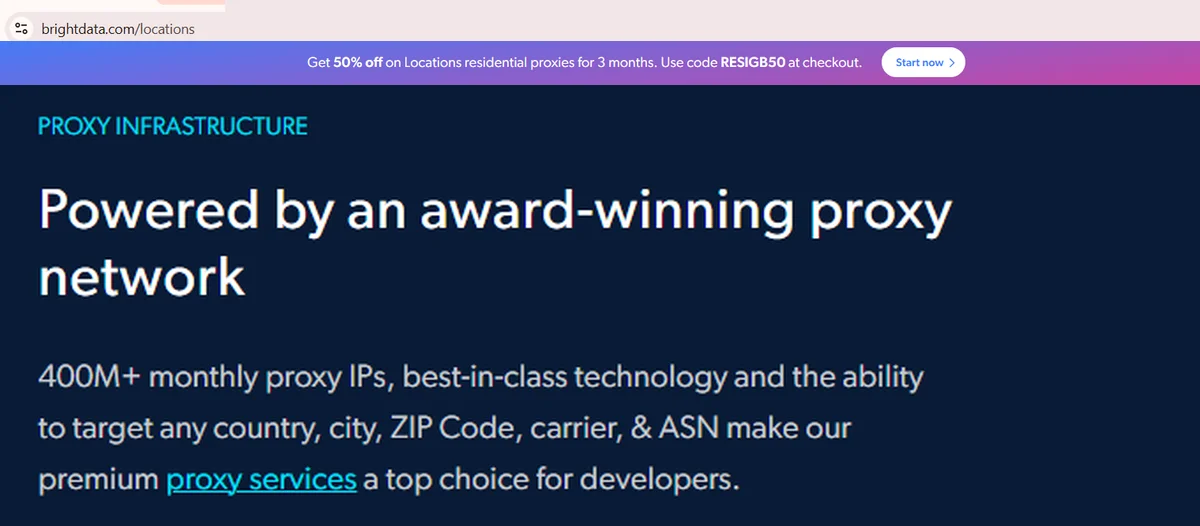
Source: Proxy IPs, network and targeting block, brightdata.com, screenshot taken 21.08.2026
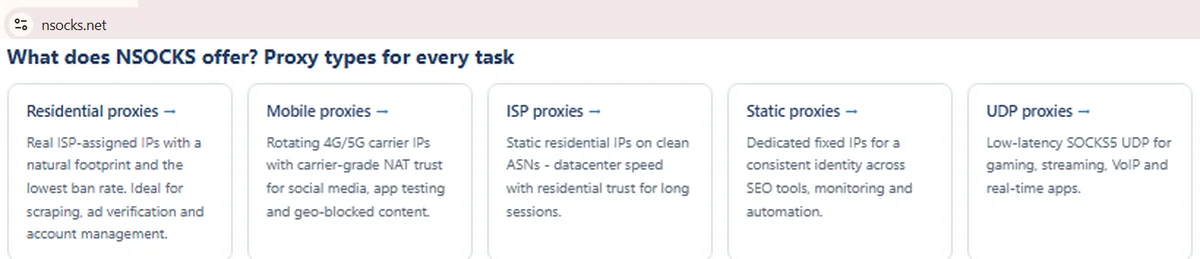
Source: Proxy types block, nsocks.net, screenshot taken 21.08.2026
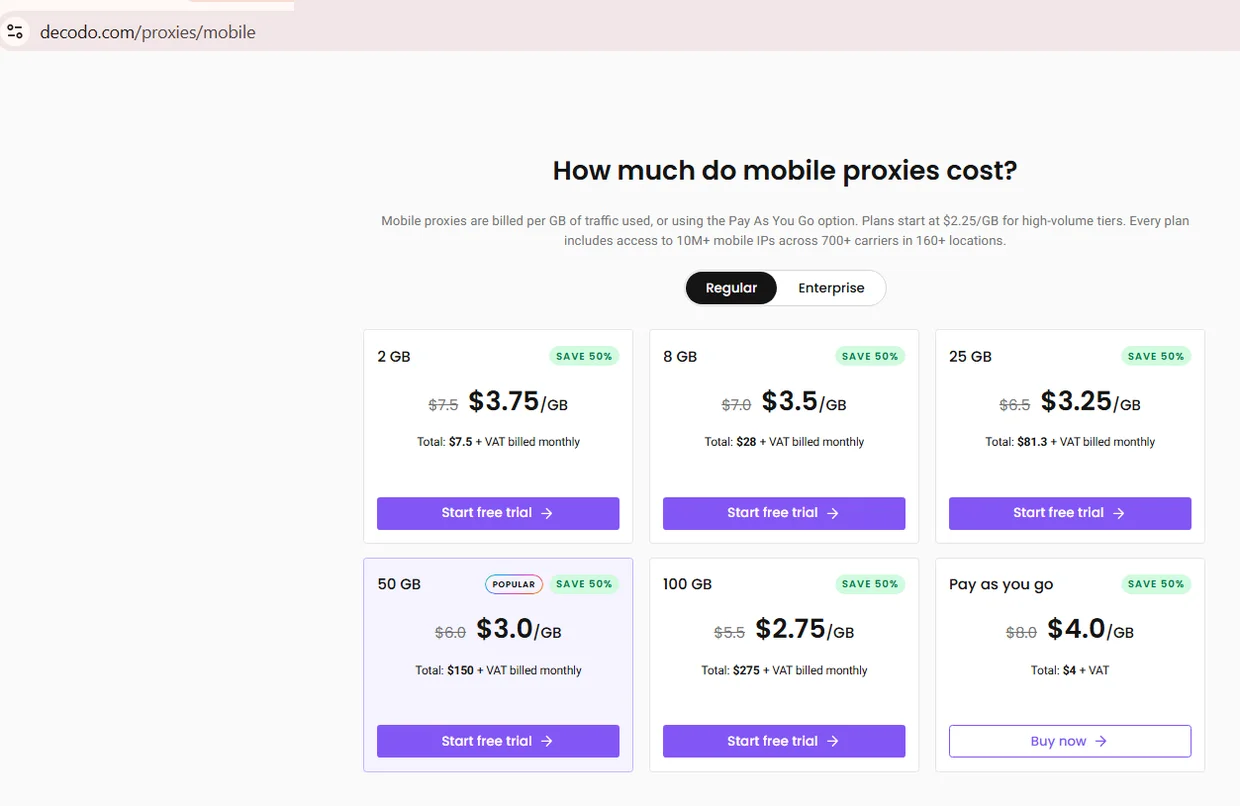
Source: Mobile Proxies pricing, Regular tab, decodo.com, screenshot taken 21.08.2026
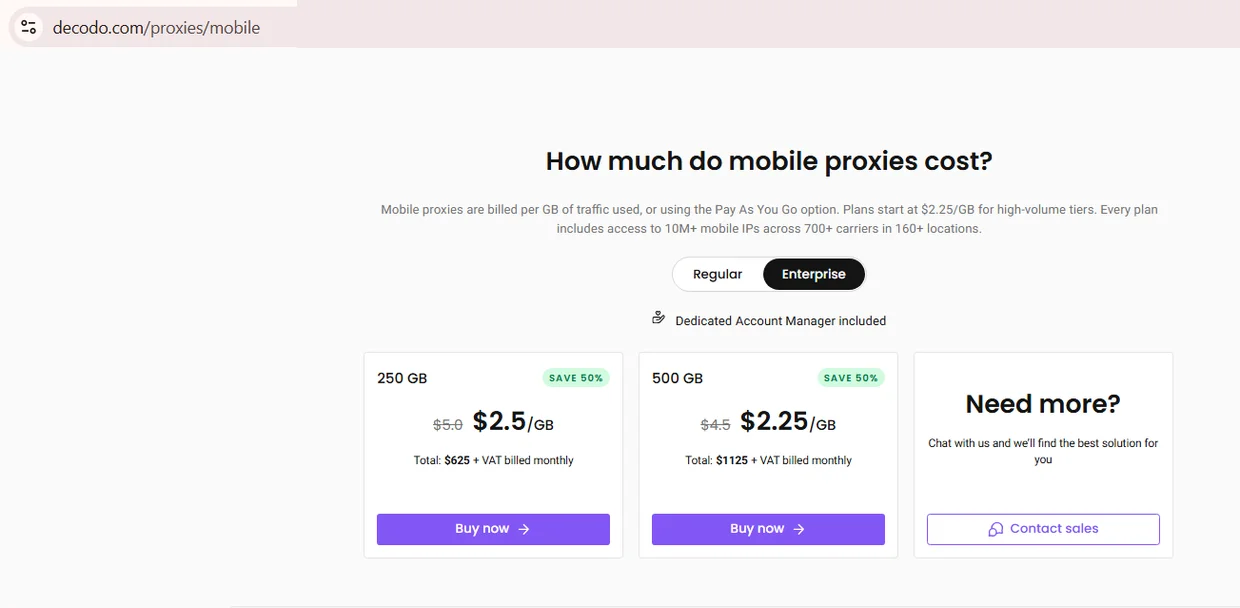
Source: Mobile Proxies pricing, Enterprise tab, decodo.com, screenshot taken 21.08.2026
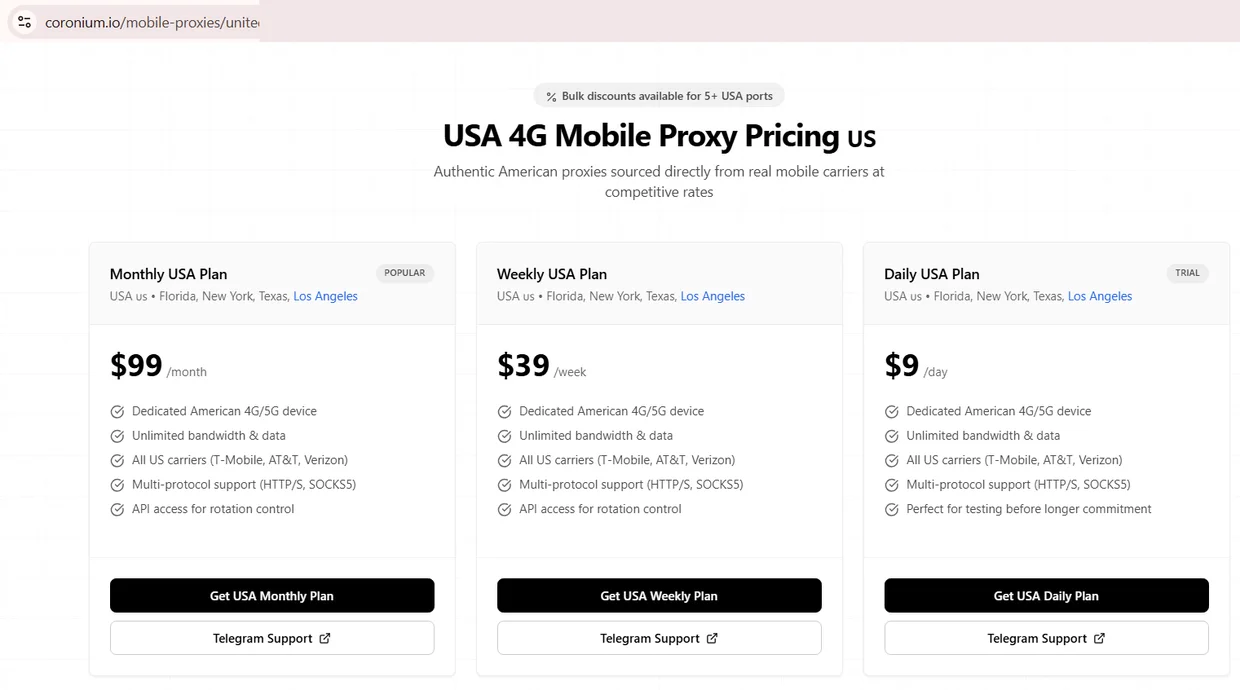
Source: USA 4G Mobile Proxy Pricing, coronium.io, screenshot taken 26.08.2026
Re-check every figure above on the provider's page, since tariffs shift faster than reviews update.
Rotation control and session length
Rotation decides how long one mobile IP stays assigned before the next request gets a new one. Providers typically offer three modes: time-based, per-request, and API-triggered rotation. Choosing the best mobile proxy setup depends on whether a workflow needs a stable identity for minutes or a fresh IP each hit. Rotating mobile proxies switch on a dashboard schedule, suited to scraping over logins.
- ✅ Time-based mobile ip rotation, documented interval, fits ad verification
- ✅ Sticky session via session ID, useful for app testing flows
- ❌ Rotation on every request isn't offered on every tier
- ⚠️ API-triggered rotation carries frequency limits on some plans
Geo and carrier targeting
Targeting options usually include country, state, city, carrier and ASN. Before anyone decides to buy mobile proxies for a geo job, an independent geo check beats trusting the provider's dashboard number. Carrier-grade NAT groups subscribers behind one exit IP, which often resolves to the carrier node's location, not the phone itself. City-level accuracy on mobile ranges is weaker than country or state targeting, a network property, not a flaw unique to one provider.
An asn check confirms an IP genuinely belongs to a carrier's autonomous system before a targeting claim gets trusted.
Speed, latency and what affects them
Speed on a mobile connection depends on more variables than a wired one. Tower load, cell distance, radio generation and CGNAT hop shift latency within a session. Anyone comparing the best mobile proxies on paper should treat a published average as a snapshot, not a guarantee.
| Metric | What affects it | How to measure |
|---|---|---|
| Download speed | Tower load, device, generation | Speed test through the proxy, varied hours |
| Upload speed | Same, plus sessions on one modem | Repeated tests, logged with a timestamp |
| Latency | Tower distance, CGNAT hop, target location | p50 and p95 across 200+ requests |
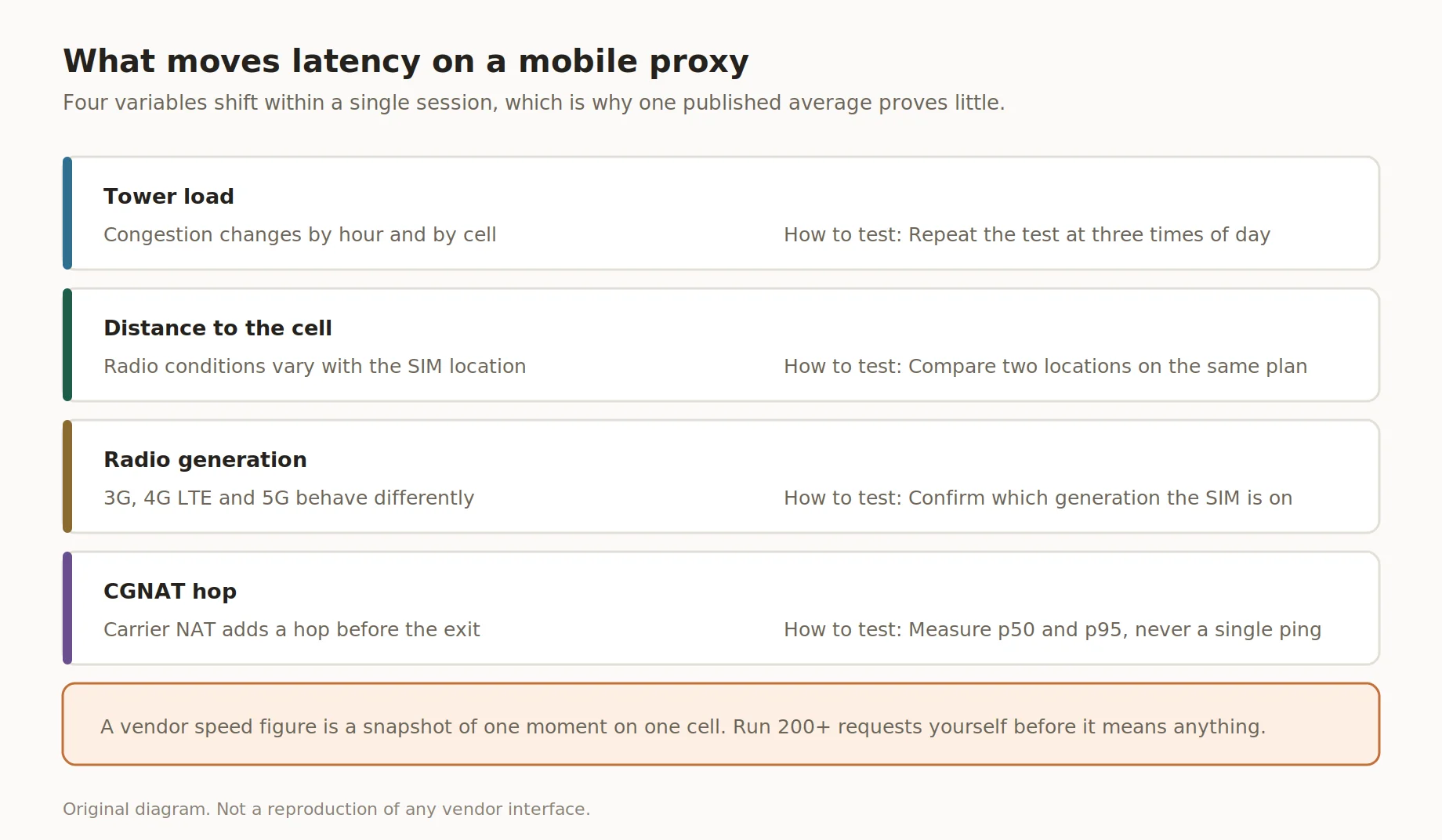
What moves latency on a mobile proxy
Independent benchmarks exist and are worth reading, but they are third-party tests rather than vendor documentation, and at least one of them discloses commercial ties to some of the vendors it ranks. Treat their numbers as a starting point and re-run the measurement yourself.
Pricing models and how to compare across them
Mobile proxy pricing rarely uses one unit market-wide. Providers bill per gigabyte, per day, per week or month of a rented modem, or per IP for a 24-hour block. Comparing raw numbers is meaningless, so anyone about to buy mobile proxies should normalize the cost first.
Take one session running eight hours a day for 30 days. Coronium prices its USA plans at $9 a day, $39 a week and $99 a month, all for a dedicated 4G or 5G device with unlimited bandwidth. Renewing the daily plan for a month costs about $270, roughly three times the monthly plan for the same device, which is the kind of gap a per-day headline hides. Decodo bills the same workload by traffic: $3.75 per GB on the 2 GB plan, $2.75 at 100 GB and $2.25 at 500 GB, every tier discounted fifty percent against a struck-out base. Pick the unit that matches the job before comparing any two numbers. A per-GB pool plan depends on data pulled during those hours. ⚠️ List price only; promo pricing isn't the standing rate.
How to test a mobile proxy before buying
Testing before committing catches most problems a dashboard won't show. The steps apply to a shared pool or a dedicated modem offer, run them on a small trial before picking the best mobile proxy for the job. None of it needs tools beyond a proxy checker, ASN lookup and stopwatch.
- Run an asn check on the assigned IP to confirm it belongs to a carrier, not a host.
- Check the IP type via a classifier that separates MOB from ISP and DCH ranges.
- Verify the location against an independent geo service, not the dashboard.
- Run a latency test as p50 and p95 across 200+ requests, not one ping.
- Watch IP behavior during rotation, confirm the interval matches what's advertised.
- Run the same sequence against the target site before buying a full plan.
These six steps turn a claim into something checked.
Common mistakes when buying mobile proxies
Most problems when people buy mobile proxies trace to a skipped verification step, not bad luck. The mistakes below repeat across support tickets, easy to make under time pressure. None need deep skill, a slow first step.
- ❌ Trusting the dashboard's geo label without a check
- ❌ Comparing per-GB and per-day prices unweighted
- ❌ Skipping a trial when offered
- ❌ Ignoring subscribers-per-IP, when disclosed
- ❌ Assuming city-level geo is exact
How NSOCKS mobile proxies fit
Disclosure: NSOCKS is our service. Among the mobile proxy providers covered, NSOCKS runs a shared carrier pool with SOCKS5 support, billed per IP for 24 hours rather than per gigabyte or as a flat modem fee. The table states what that means in practice.
| Feature | What it means in practice |
|---|---|
| SOCKS5 support | Works with most scraping and automation tools |
| Per-IP billing, 24 hours | Cost tracks the addresses you keep, not a flat modem fee |
| 4G LTE and 5G coverage | Routes through either generation, by exit node |
| Dashboard rotation control | Interval and sticky session set without a ticket |
Current terms are published on the mobile proxies page, alongside the residential and ISP lines. Try the NSOCKS demo before committing to volume.
Key takeaways
A few points worth remembering before comparing best mobile proxies on the market:
- Dedicated modem and shared carrier pool are different business models, not tiers of one thing.
- City-level geo accuracy on mobile IPs is limited by carrier-grade NAT, not by any one provider.
- Billing units vary widely, so normalize to one usage scenario before comparing prices.
- Test with an ASN check, IP classifier and independent geo lookup before buying at scale.
- NSOCKS is one of several providers listed here, and we have a commercial interest in it.
Disclosure and data sources
This roundup of best mobile proxies draws on official pages plus one benchmark.
This article is published by NSOCKS. NSOCKS is one of the services listed and we have a commercial interest in it. We are not affiliated with any other provider mentioned; none of them sponsored or reviewed this article. Third-party data was taken from the providers' own pages on August 2026 and may be promotional. All trademarks belong to their respective owners and are used for identification only.
Frequently asked questions
What is a mobile proxy?
A proxy that routes traffic through an IP a carrier assigned to a SIM on a cellular network.
How do I check that a mobile IP is really from a carrier?
Run an ASN lookup, check the IP type classifier, confirm it isn't a hosting or VPN range.
Why is city-level geo often inaccurate on mobile IPs?
Carrier-grade NAT routes many subscribers through one node, so the IP often maps to that node's city.
What is the difference between a dedicated modem and a shared mobile pool?
A dedicated modem gives one exclusive IP; a shared pool draws from millions of IPs used by many.
How do I compare mobile plans with different billing units?
Convert every plan to one identical usage scenario, like eight hours a day for 30 days.
When is a residential proxy enough instead of a mobile one?
When the task doesn't need carrier-level trust, like general browsing or non-mobile scraping.